Appsudo framework is a lightweight, cross-platform application development framework that allows developers to create beautiful, responsive mini apps with minimal effort. Using Python for logic and XML for layouts, Appsudo provides a simple yet powerful way to build applications.
Write Once, Run Anywhere
Build applications that run consistently across multiple platforms.
Intuitive Styling
Style components using an XML-like syntax that's easy to learn and use.
Powerful Components
Access a rich library of UI components to build sophisticated interfaces.
Development Environment Setup
Follow these steps to set up your development environment for Appsudo mini app development.
Step 1: Install Visual Studio Code
Download and install Visual Studio Code, the recommended IDE for Appsudo development.
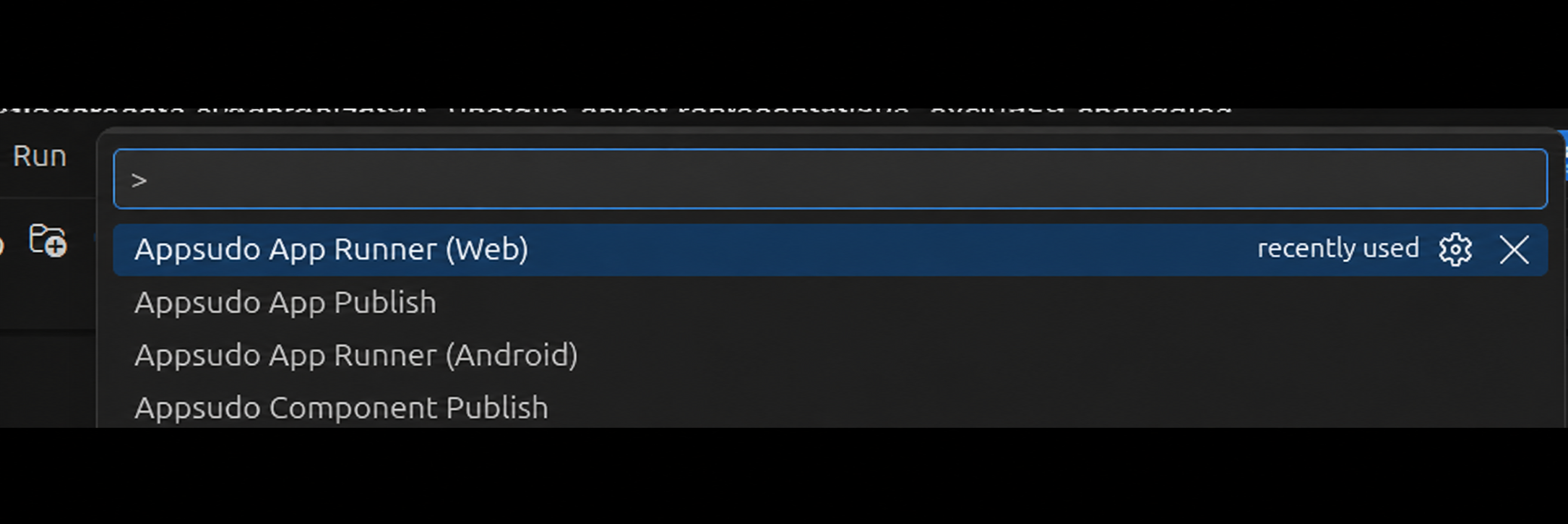
Press Ctrl+Shift+P (or Cmd+Shift+P) for Command Palette.
Type "Appsudo" and select "Appsudo App Runner".
Select your target device.
Developer Account
A developer account and Publish API Key are required when you are ready to publish an app or component. Complete development and testing before starting this workflow.
Publish from VS Code
Open the completed project in VS Code.
Open the Command Palette with Ctrl+Shift+P, or Cmd+Shift+P.
Type Appsudo.
Choose Appsudo App Publish for an app. Choose Appsudo Component Publish for a component.
Select the publishing command that matches the project type.
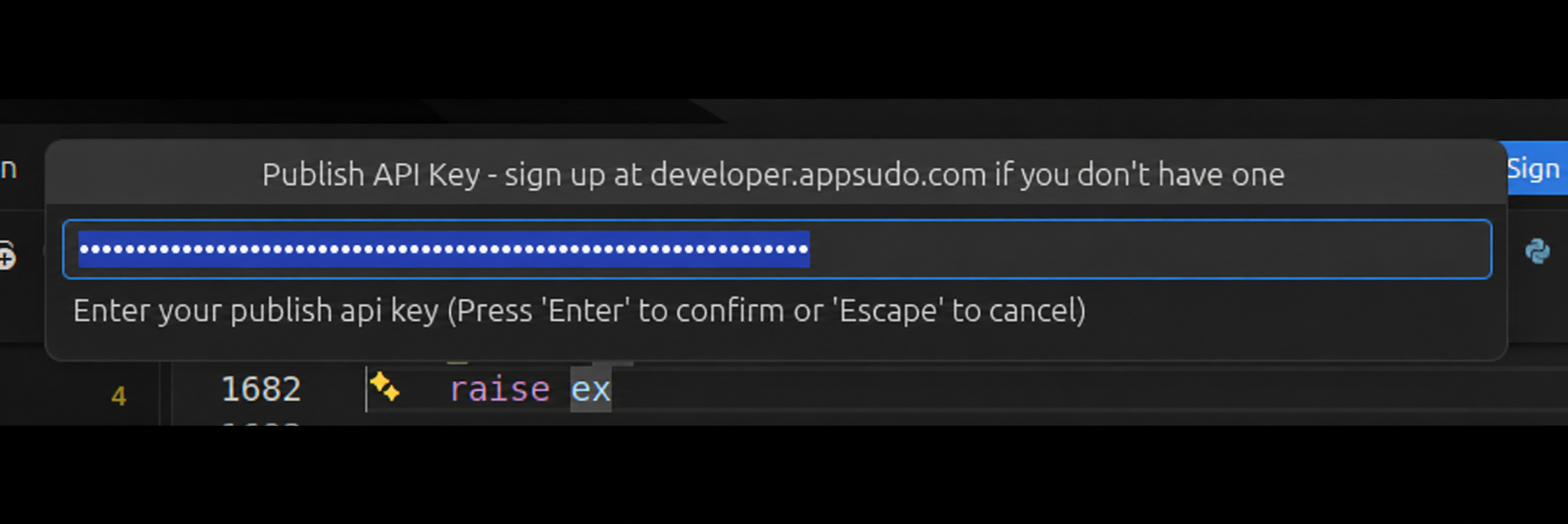
The extension prompts for a Publish API Key. Register at developer.appsudo.com if you do not have an account or key.
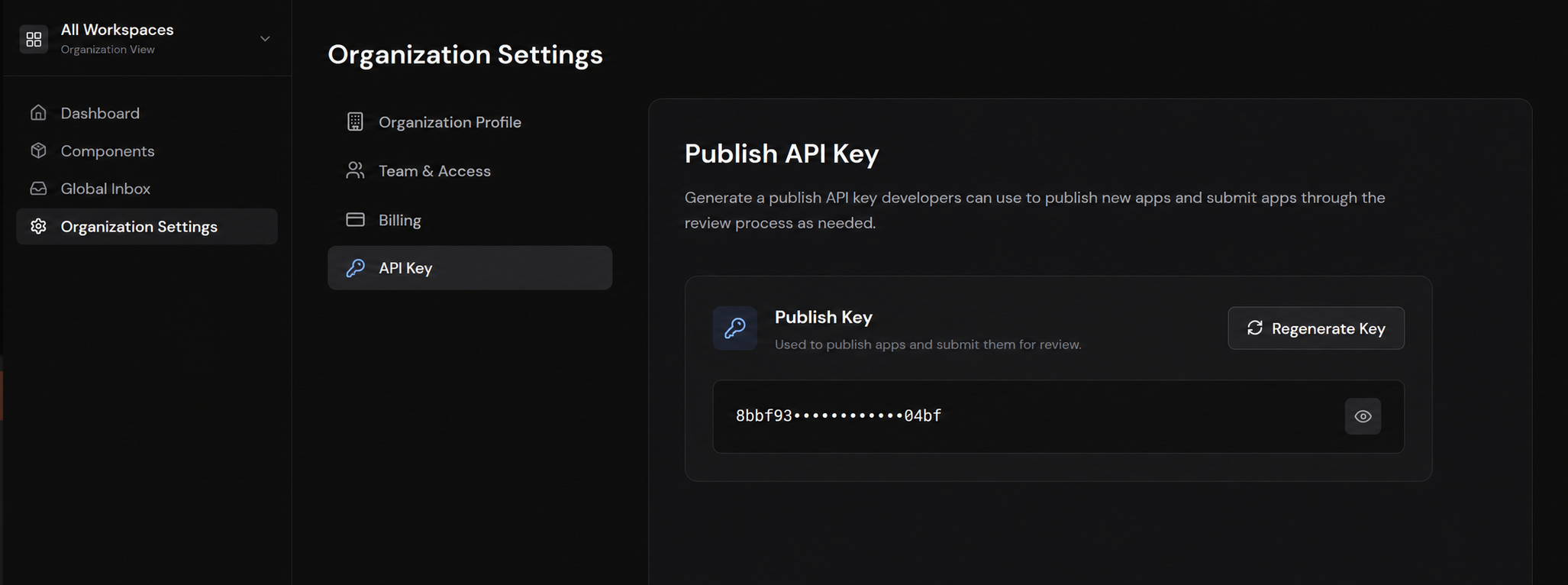
Generate a Publish API Key. If a key already exists and must be replaced, use Regenerate Key.
Return to VS Code, enter the key, and wait for the successful publication confirmation.
Generate or regenerate the Publish API Key from Organization Settings.
Find and Manage the Published App
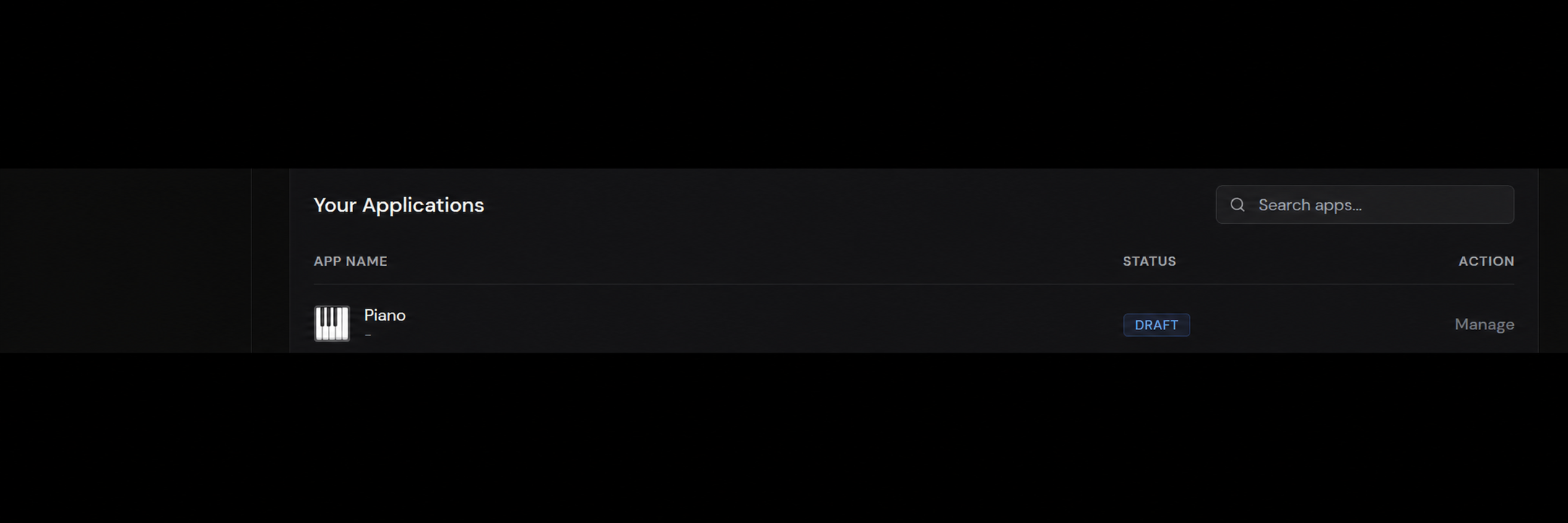
After VS Code confirms that publication succeeded, open the organization dashboard. Find the app in Your Applications, then select Manage.
Use Manage to open the app's publishing and store settings.
Complete Store Presence
From the managed app, open Store presence. Complete every required listing detail, including screenshots, the description, and any other information that was not supplied or was incomplete in metadata.json. A release cannot be submitted until the required store presence details are complete.
Create a Release and Send It for Review
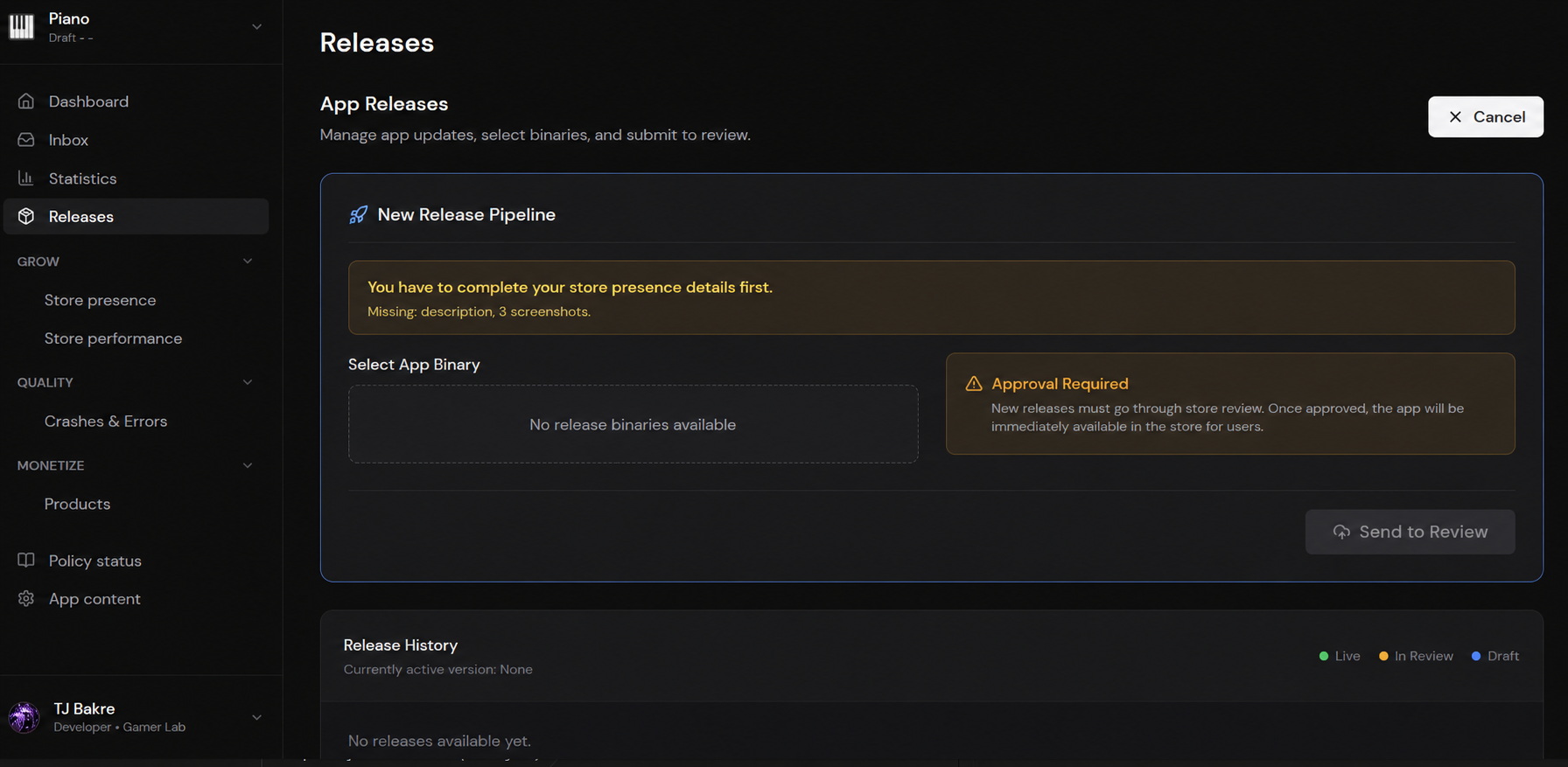
Open Releases for the managed app.
Create a new release and select the correct published binary.
Choose Send to Review.
The release receives a light review. After approval, it becomes visible at store.appsudo.com.
App-specific communication and review information appears in the app's Inbox and Policy status areas.
Complete store presence, select the intended binary, then send the release for review.
Appsudo App Structure
Appsudo mini apps follow a specific directory structure. Understanding this is key for development.
PROJECT EXPLORER
myapp/
myapp.py
data/
config.json
view/
main_view.asxml
style/
styles.ascss
res/
images/
icons/
metadata.json
secrets.json
Key Components
myapp.py: Main application entry point.
data/: JSON files for data loading.
view/: ASXML files for UI layouts.
style/: ASCSS files for styling.
res/: Resource files (images, etc.).
metadata.json: App metadata.
secrets.json: App secret.
General Guidance & Naming Conventions
A few conventions are enforced by the Appsudo runtime when it loads and tracks your app. Follow these when creating a new app to avoid load-time errors and runtime crashes.
Folder name
Each Appsudo app is loaded as a Python module, so the app's folder name must be all lowercase and contain no spaces, hyphens, or other special characters. For an app named SportGame, the folder must be sportgame/.
App class name
Your main class must subclass App and follow the <Name>App convention. For SportGame:
class SportGameApp(App):
    ...
Constructor identifier
Inside __init__, the first argument to super().__init__(...) is the app's runtime identifier. It is used internally for tracking your app, so it must be passed as a single string with no spaces or extra wording. For SportGame:
self.render(...) may only be called once per app, and that single call must happen within the execution context of def run(self), either directly inside run() or inside any helper method that run() invokes. Any additional call to self.render(...) will raise an exception and crash your app.
def run(self):
    self._show_main_view()

def _show_main_view(self):
    # Allowed: render() lives in a helper, but it is only reached via run().
    self.render(self.ui_view)
Data binding (recommended)
For apps that use the Appsudo UI layer (i.e. not pygame-driven apps), define a self.data object in __init__ and let the view inflater bind against it, as shown in the App Structure example. This keeps your view declarative and your state in one place.
The Appsudo runtime drives every App through a fixed sequence of lifecycle hooks. Rendering happens only inside run(); the hooks before it are for setup and data, and the hooks after it react to readiness and mode changes.
Store runtime info (e.g. register users in an external DB, build a profile)
run
Renders the app to the device (mobile and web)
Call self.render(...) (once)
on_ready
After the app is fully ready
Begin any actions / load initial state
on_app_mode_change(app_mode)
On every mode change (repeats). app_mode = new mode; self.get_app_mode() = previous mode
Transition the visualization between modes
Lifecycle hooks
Override these methods on your App subclass. The runtime calls them in order: on_launch first (app not rendered yet, good for initializing or preloading data), then set_data (still pre-render, receives a metadata object), then run (renders the app to the device), then on_ready (app fully ready to act), and finally on_app_mode_change (called on every mode change thereafter).
def on_launch(self):
    # App not rendered yet. Initialize or preload data here.
    self.pending_user_id = None

def set_data(self, metadata):
    # Pre-render. metadata includes config, decrypted secrets,
    # profileId, profileUserName, profileAvatar, appId, appName, appVersion.
    # Store at runtime to register users in an external DB, build a profile, etc.
    self.profile_id = metadata.get("profileId")
    self.profile_user_name = metadata.get("profileUserName")
    self.app_id = metadata.get("appId")

def run(self):
    # Renders the app to the device (mobile and web). self.render() goes here.
    self.render(self.ui_view)

def on_ready(self):
    # App is fully ready to perform actions.
    self._load_initial_state()

def on_app_mode_change(self, app_mode):
    # app_mode = the NEW mode the app is transitioning to.
    # self.get_app_mode() = the PREVIOUS mode, prior to this change.
    # Use both to decide how to transition the visualization.
    self._transition(from_mode=self.get_app_mode(), to_mode=app_mode)
App modes
An app runs in one of four modes: FULLSCREEN (the default), WIDGET (shown as a small window in the center of the screen), POPUP (shown as a bottom dialog that takes about 70–80% of the screen), and MINIMIZE (your app is docked into a feed post and should resize accordingly). In on_app_mode_change(app_mode), app_mode is the new mode the app is transitioning to, while self.get_app_mode() returns the previous mode (prior to this call); use both to drive the visual transition.
def on_app_mode_change(self, app_mode):
    # app_mode = NEW mode transitioning to
    # self.get_app_mode() = PREVIOUS mode, prior to this change
    if app_mode == "WIDGET":
        self._render_compact(from_mode=self.get_app_mode())
    elif app_mode == "POPUP":
        self._render_sheet(from_mode=self.get_app_mode())
    elif app_mode == "MINIMIZE":
        self._render_docked(from_mode=self.get_app_mode())
If you don’t want your app to run in a specific mode, override get_allowed_mode and return the array of modes you want to support:
When the same value or array appears in several components, updating every component manually makes the code harder to follow. It can also require separate calls such as refresh() to keep every view in sync.
Manual updates
# Single value
value = "newvalue"
self.text = f"{value} - something"
self.text2 = value

# Array
self.repeat_view.set_items(newarray)
self.repeat_view.refresh()
Use State when one value needs to drive multiple components. Create the state in your class, then use the existing inflater to expose the class data to the view:
from runtime import State

# Initial state
self.value = State("initial value")
self.array = State([1, 2, 3])
Gamepad selection applies when metadata.json sets "type": "Game". Override get_gamepad() on your App subclass to hide the controller or load a different controller component. Without an override, or when the method returns "default", Appsudo loads the existing sudogamepad component.
Return value
Behavior
None
Completely hides the gamepad.
"default"
Loads the existing sudogamepad component. This is also the behavior when get_gamepad() is not overridden.
Existing component name
Dynamically loads that component for the game.
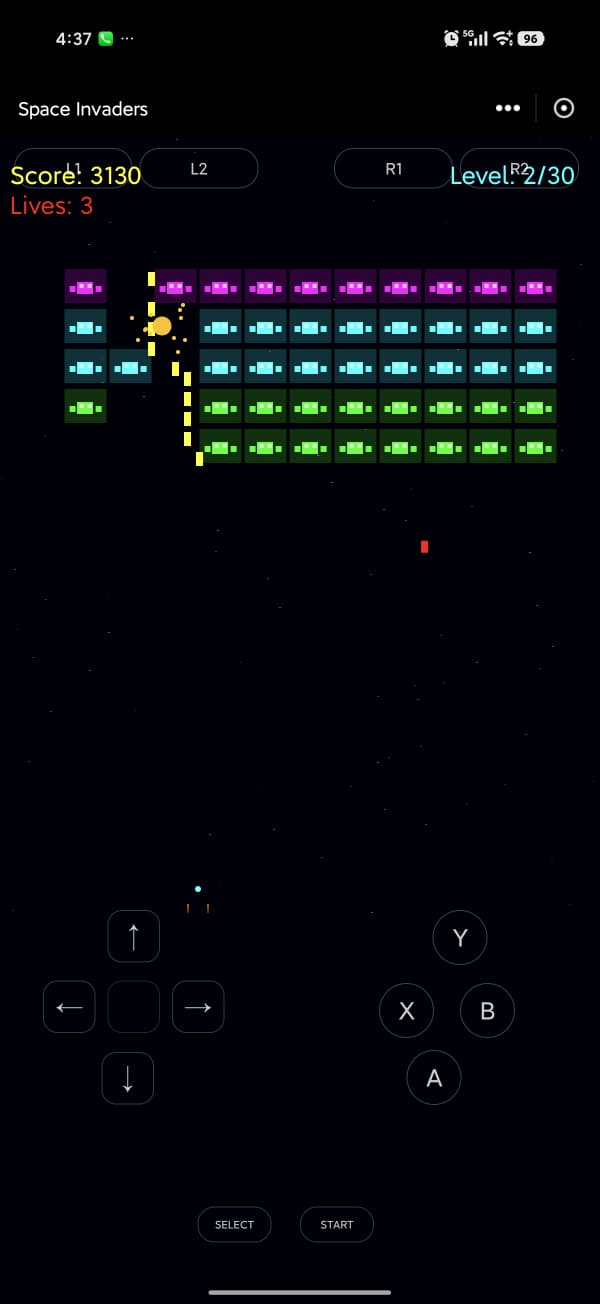
Example of the default sudogamepad component displayed over a Game app.
Hide the controller
def get_gamepad(self):
    return None
Load a custom controller component
def get_gamepad(self):
    return "componentname"  # Replace with an existing component name.
Screen Size
Read the current display size from AppContext:
from appsudo import AppContext

display_size = AppContext.current().displaySize()
Use display_size only for broad checks, such as determining whether the width is larger than the height for a rotated device or tablet-style layout. Do not build complex application logic around exact dimensions.
Light/Dark Mode
Use the runtime display mode to choose theme-appropriate colors, assets, and presentation:
from appsudo import AppRuntime

is_dark_mode = AppRuntime.IS_DARK_MODE
Running Platform
Use AppRuntime when non-UI code needs the current platform:
Keep rendering and UI behavior platform agnostic. Limit these values to non-UI uses such as API request context or app-specific statistics. Platform information is already available in the Appsudo developer portal, so most apps do not need to collect it themselves.
Sharing & data continuation
Override get_shareable to return True/False (default is False) to decide whether Appsudo should allow your app to be shared on the feed and in DMs. This can be a dynamic check; for example, only allow sharing for paying users, or return False while the app is showing sensitive/private details that should not be shared publicly.
def get_shareable(self):
    # Dynamic: block sharing while sensitive content is on screen.
    if self.is_showing_sensitive_details:
        return False
    return self.is_paying_user
When a user shares your app to the feed or elsewhere in Appsudo, the runtime calls your get_data, which should return a dict representing the state of your app:
Appsudo provides a rich library of UI components. Browse by category below or jump directly to one from the sidebar.
Layout
HorizontalView
layout
A container that arranges its children horizontally in a row. Supports proportional sizing via weight-sum / weight and can be made interactive on its own with clickable.
weight-sum on the parent defines the total proportional space. Each child sets weight="N" to claim N/total of the parent's main-axis size, and uses width="0dp" so the layout engine sizes it from the weight instead of a fixed width. Weights are relative, not percent-locked, but using a total of 100 makes them read like percentages.
Any view (including HorizontalView) can fire on-click itself when clickable="true" is set. The whole row becomes the hit area, and children that don't have their own on-click simply pass the click through to the container.
Anchors the view relative to its parent or a sibling. Mostly used inside a RelativeView.
idstring
Identifier for retrieval via find_element_by_id(id).
style"namespace.style_name"
Apply a style block from an external ASCSS file.
enabled"true" | "false"
If false the view (and its children) won't receive interactions.
VerticalView
layout
A container that arranges its children vertically in a column. Supports proportional sizing via weight-sum / weight and can be made interactive on its own with clickable.
Set clickable="true" on any Layout-category view (VerticalView, HorizontalView, ScrollView, RelativeView, RepeatView, View, BottomView, DrawerView, PopupView) to turn it into a single tap target. Nested children that don't define their own on-click pass clicks up to the container.
from components.view import ScrollView, VerticalView
from components.form import Label

# Create a scroll view
scroll_view = ScrollView()

# Create a vertical view as content
content = VerticalView()

# Add items to the content
for i in range(20):
    label = Label()
    label.set_text(f"Item {i+1}")
    content.add_element(label)

# Add the content to the scroll view
scroll_view.add_element(content)
scroll_view.refresh()
RelativeView
layout
A container that positions components relative to one another or to the parent container.
from components.view import RepeatView

# In your App class:

# Assuming TextData class is defined elsewhere or is a simple placeholder
class TextData:
    def __init__(self, text):
        self.text = text

def setup(self):
    self.list = [TextData("Item 1"), TextData("Item 2"), TextData("Item 3")]
    self.repeat_view = RepeatView()
    self.repeat_view.set_on_create_view(self.on_create_view)
    self.repeat_view.set_on_bind_view(self.on_bind_view)
    self.repeat_view.set_items(self.list)
    self.repeat_view.set_layout_type("vertical")

def on_create_view(self, parent):
    # Create and return a view for each item
    view = self.inflater.inflate("item_template", None) # Assuming item_template.asxml exists
    return view

def on_bind_view(self, view, item):
    # Bind data to the view
    label = view.find_element_by_id("item_label") # Assuming item_label ID in item_template.asxml
    label.set_text(item.text)
Methods
set_on_create_view(callback)
Sets the callback function that creates a view for each item
set_on_bind_view(callback)
Sets the callback function that binds data to each created view
set_items(items)
Sets the collection of items to display
set_layout_type(type)
Sets the layout type: 'horizontal', 'vertical', or 'grid'
from components.view import View
from components.form import Label

# Create a view
view = View()

# Add a label to it
label = Label()
label.set_text("Custom View Content")
view.add_element(label)
view.refresh()
Methods
add_element(child)
Adds a child component to the view
refresh()
Refresh the view with latest changes
find_element_by_id(id)
Finds a child component by its ID
BottomView
layout
A bottom-sheet container that slides up from the bottom of the screen. Toggled programmatically with show() / dismiss(). Useful for action sheets, confirmation prompts, or any contextual UI that should not take over the whole screen.
Returns a child element by its id (inherited container method).
add_element(child)
Appends a child component programmatically.
Attributes
idstring
Identifier used to retrieve the view via find_element_by_id.
width / height"fill" | "wrap" | "Ndp"
Sizing of the sheet. height="wrap" keeps it as short as its content.
padding / margin"Ndp"
Inner and outer spacing. Side-specific variants are supported.
background-color"#RRGGBB" | named color
Background fill of the sheet.
border-width / border-color"Ndp", color
Outline of the sheet.
border-radius-top-left / -top-right"Ndp"
Rounded top corners. Typical for bottom sheets.
border-radius-bottom-left / -bottom-right"Ndp"
Rarely used since the bottom edge usually meets the screen.
weight / weight-sumnumber
Supports the proportional layout model when nested inside a weighted parent.
clickable"true" | "false"
When true the sheet itself responds to on-click taps.
on-clickcallback name
Optional handler for tapping inside the sheet itself.
align-to"parent@bottom" | "parent@top" | etc.
Anchor inside a RelativeView parent. BottomView typically docks to parent@bottom automatically.
DrawerView
layout
A slide-in side drawer that pairs a data-driven navigation menu with three named slot containers: DrawerToolbarView (top toolbar), DrawerHeaderView (above the menu list), and DrawerFooterView (pinned to the bottom). The drawer menu and toolbar are populated from Python data and re-rendered when you update them.
Menu Data Structure
The drawer-menu attribute is bound to a Python dict. Each key is a section header (use "" for ungrouped top-level items) and each value is a list of item dicts. Item dicts accept title (string, required), icon (full resource path, optional), and checked (bool, optional; used to render a checkmark / current-state indicator).
All Layout-category capabilities apply. DrawerView can host weighted children and respond to its own taps.
idstring
Optional identifier.
Slot Elements
DrawerToolbarView
Top toolbar/title area. Accepts standard Layout attributes; most commonly width="fill", height="wrap".
DrawerHeaderView
Section rendered above the data-driven menu list. Good for greetings, search bars, etc.
DrawerFooterView
Pinned to the drawer's bottom edge. Typical for the signed-in user row.
PopupView
layout
A modal overlay container that floats above the rest of the UI. Toggled with show() / dismiss(); an optional on-dismiss callback fires when the user closes it.
PopupView is a Layout-category container, so it supports proportional layout and can be made tappable itself.
alignment"center" | "left" | "right" | etc.
Aligns child content inside the popup.
Input
Button
input
An interactive clickable element that triggers actions when pressed.
XML Usage
<Button
  text="Click Me"
  on-click="on_click"
  background-color="#4a6cff"
  font-color="white"
  padding="10dp"
  border-radius="5px"
/>
Python Usage
from components.form import Button

# Create a button
button = Button()
button.set_text("Click Me")
# button.set_on_click(self.on_click) # Assuming self.on_click is defined in the app class

# Define the click handler in your app class
# def on_click(self, element):
#     # Handle button click
#     print("Button clicked!")
Methods
set_text(text)
Sets the button label text
set_on_click(callback)
Sets the callback function that is called when the button is clicked
from components.form import TextBox

# Create a text box
text_box = TextBox()
text_box.set_text("Initial text")
text_box.set_placeholder("Enter text...")
text_box.set_input_type("single")
# text_box.set_on_change(self.on_text_change) # Assuming self.on_text_change is defined

# Define the change handler in your app class
def on_text_change(self, element, value):
   print(f"Text changed: {value}")
from components.form import Checkbox

# Create a checkbox
checkbox = Checkbox()
checkbox.set_text("Enable feature")
checkbox.set_checked(True)
checkbox.set_enabled(True)
# checkbox.set_on_change(self.on_checkbox_change) # Assuming self.on_checkbox_change is defined

# Define the change handler in your app class
# def on_checkbox_change(self, element, checked):
#     print(f"Checkbox changed: {checked}")
Methods
set_text(text)
Sets the label text for the checkbox
set_checked(checked)
Sets whether the checkbox is checked
set_enabled(enabled)
Sets whether the checkbox is enabled or disabled
set_on_change(callback)
Sets the callback function that is called when the checkbox state changes
get_checked()
Returns whether the checkbox is checked
CheckboxList
input
A group of checkboxes for selecting multiple options.
from components.form import CheckboxList

# Create a checkbox list
checkbox_list = CheckboxList()
checkbox_list.set_options(["Option 1", "Option 2", "Option 3"])
checkbox_list.set_checked_states([True, False, False])
checkbox_list.set_enabled(True)
# checkbox_list.set_on_change(self.on_checkbox_list_change) # Assuming self.on_checkbox_list_change

# Define the change handler in your app class
# def on_checkbox_list_change(self, index, element, is_checked):
#     print(f"Option {index} changed: {is_checked}")

# Get checked options
# checked_options = checkbox_list.get_checked_options()
Methods
set_options(options)
Sets the list of options
set_checked_states(states)
Sets the checked state for each option
set_enabled(enabled)
Sets whether the checkbox list is enabled or disabled
set_on_change(callback)
Sets the callback function that is called when an option's state changes
get_checked_options()
Returns the list of checked options
Radio
input
A single radio button for selection.
XML Usage
<Radio
  text="Select this option"
  checked="{data.selected}"
  on-change="on_radio_change"
  enabled="true"
/>
Python Usage
from components.form import Radio

# Create a radio button
radio = Radio()
radio.set_text("Select this option")
radio.set_checked(True)
radio.set_enabled(True)
# radio.set_on_change(self.on_radio_change) # Assuming self.on_radio_change is defined

# Define the change handler in your app class
# def on_radio_change(self, element, checked):
#     print(f"Radio changed: {checked}")

# Check if radio is checked
# is_checked = radio.get_checked()
Methods
set_text(text)
Sets the label text for the radio button
set_checked(checked)
Sets whether the radio button is checked
set_enabled(enabled)
Sets whether the radio button is enabled or disabled
get_checked()
Returns whether the radio button is checked
set_on_change(callback)
Sets the callback function that is called when the radio button state changes
is_checked()
Returns whether the radio button is checked
RadioList
input
A group of radio buttons for selecting a single option.
from components.form import SpinBox

# Create a spin box
spin_box = SpinBox()
spin_box.set_range((0, 100))
spin_box.set_value(50)
spin_box.set_enabled(True)
# spin_box.set_on_change(self.on_spin_box_change) # Assuming self.on_spin_box_change

# Define the change handler in your app class
# def on_spin_box_change(self, element, old_value, new_value):
#     print(f"Value changed from {old_value} to {new_value}")

# Get current value
# current_value = spin_box.get_value()
Methods
set_range(range)
Sets the range as a tuple (min, max)
set_value(value)
Sets the current value
get_value()
Returns the current value
set_enabled(enabled)
Sets whether the spin box is enabled or disabled
set_on_change(callback)
Sets the callback function that is called when the value changes
from components.form import Icon
# Assuming application_path is defined in the context where this code runs
# For example, in an App class: self.application_path

# Create an icon
icon = Icon()
# icon.set_src(application_path + "/res/images/icon.png")
icon.set_color("#4a6cff")
icon.set_size("24dp")
Methods
set_src(src)
Sets the icon source path
set_color(color)
Sets the icon color (supports color name and hex color)
set_size(size)
Sets the icon size (e.g., '24dp')
Progress
display
A progress indicator for showing loading or completion status.
from components.form import Progress

# Create a determinate progress bar
progress_bar = Progress()
progress_bar.set_progress(50)  # Current value
progress_bar.set_max_progress(100)  # Maximum value
progress_bar.set_progress_style("horizontal")

# Create an indeterminate progress indicator
loading_indicator = Progress()
loading_indicator.set_indeterminate(True)
loading_indicator.set_progress_style("default")
Methods
set_progress(progress)
Sets the current progress value
set_max_progress(max_progress)
Sets the maximum progress value
set_indeterminate(indeterminate)
Sets whether the progress indicator is indeterminate (ongoing activity without specific progress)
set_progress_style(style)
Sets the progress style: 'horizontal' or 'default'
BottomMenu
display
A navigation menu displayed at the bottom of the screen.
XML Usage
BottomMenu is primarily created and managed in Python code.
Python Usage
from components.basic import BottomMenu
# Assuming application_path is defined, e.g., self.application_path in an App class

# Create a bottom menu
bottom_menu = BottomMenu()
bottom_menu.set_icon_size(24)  # Set icon size to 24dp
# bottom_menu.set_menu_items([
#     ("Home", application_path + "/res/images/home_icon.png"),
#     ("Search", application_path + "/res/images/search_icon.png"),
#     ("Profile", application_path + "/res/images/profile_icon.png")
# ])

# Set click handlers
# bottom_menu.set_click_handlers([
#     self.on_home_click,       # Assuming these methods are defined in the app class
#     self.on_search_click,
#     self.on_profile_click
# ])

# Define click handlers in your app class
# def on_home_click(self):
#     print("Home menu clicked")

# def on_search_click(self):
#     print("Search menu clicked")

# def on_profile_click(self):
#     print("Profile menu clicked")

# Show the bottom menu
# bottom_menu.show()

# Hide the bottom menu when needed
# bottom_menu.dismiss()
Methods
set_icon_size(size)
Sets the size of the menu item icons
set_menu_items(items)
Sets the menu items as a list of (name, icon_path) tuples
show()
Shows the bottom menu
dismiss()
Hides the bottom menu
set_click_handlers(handlers)
Sets the click handlers for menu items
BottomNavigation
display
A bottom-anchored navigation bar driven by a list of menu items. Each item shows its icon (and optionally its label) and fires a callback when tapped. Typical use is to switch between top-level screens of an app.
Menu Data Structure
The menu-items attribute is bound to a Python list of dicts. Each item dict supports title (string, required; also the value passed to the callback) and icon (full resource path to a PNG/SVG asset). The list order determines tab order from left to right.
from core import Logger

def on_navigation_click(self, element, menu):
    Logger.write(menu)
    if menu == "Home":
        self.load_home_view()
    elif menu == "Search":
        self.load_search_view()
    elif menu == "Post":
        self.load_post_view()
    elif menu == "Profile":
        self.load_profile_view()
Events
on_item_selected(element, menu_title)
Fires when a menu entry is tapped. menu_title is the title string of the selected item (not the full dict).
Attributes
menu-items{data.list}
Bound list of menu-item dicts (see structure above).
on-item-selectedcallback name
Python handler invoked when an item is selected.
label-mode"labeled" | "selected" | "unlabeled"
Controls whether icon labels are shown. "labeled" shows the label on every item; "selected" only on the active item; "unlabeled" hides them.
Outline of the bar. Often a thin top border to separate from content.
idstring
Identifier for find_element_by_id lookup.
Divider
display
A thin line used to visually separate content within a layout. Visual-only. No instance methods or events. Typically dropped between sections inside a VerticalView/HorizontalView.
from components.media import Image
from runtime.ImageHelper import ImageHelper
# Assuming application_path is defined, e.g., self.application_path in an App class

# Create an image from local path
image = Image()
# image.set_src(application_path + "/res/images/photo.jpg")
image.set_scale_type("center_crop")

# Create a rounded image
rounded_image = Image()
# rounded_image.set_src(application_path + "/res/images/avatar.jpg")
rounded_image.set_scale_type("rounded")
rounded_image.set_radius("20dp")

# Load a remote image by passing the URL string directly
remote_image = Image()
remote_image.set_src("https://example.com/image.jpg")
Methods
set_src(src)
Sets the image source (path or bitmap)
set_scale_type(scale_type)
Sets how the image should be resized or positioned: 'fill', 'fill_center', 'center', 'center_crop', 'rounded'
set_radius(radius)
Sets the corner radius for rounded images (e.g., '10dp'). Only works when scale_type is 'rounded'
from components.media import Video
# Assuming application_path is defined for local files

# Create a video player
video = Video()
video.set_uri("https://example.com/video.mp4")  # HTTP location
# Or use local file:
# video.set_uri(application_path + "/res/videos/sample.mp4")

# video.set_on_play_state_change(self.on_video_state_change) # Assuming self.on_video_state_change
# video.set_on_player_error(self.on_video_error)           # Assuming self.on_video_error

# Control playback
# video.play()
# video.pause()
# video.stop()
# video.seek_to(30000)  # Seek to 30 seconds (in milliseconds)

# Get video information
# duration = video.get_duration()
# current_position = video.get_current_position()

# Define event handlers in your app class
# def on_video_state_change(self, element, playback_state):
#     print(f"Playback state changed: {playback_state}")

# def on_video_error(self, element, error):
#     print(f"Video player error: {error}")
Methods
set_uri(uri)
Sets the video URI (URL or local file path)
set_on_play_state_change(callback)
Sets the callback function that is called when the playback state changes
set_on_player_error(callback)
Sets the callback function that is called when a player error occurs
play()
Starts or resumes playback
pause()
Pauses playback
stop()
Stops playback
seek_to(milliseconds)
Seeks to the specified position in milliseconds
get_duration()
Returns the total duration of the video in milliseconds
get_current_position()
Returns the current playback position in milliseconds
Matching getters are get_msaa(), get_depth_bits(), get_stencil(), get_transparent(), get_debug(), and get_app_dir(). Changing these settings after the canvas is first shown raises GfxError.
Other methods
set_target_fps(fps) clamps to 1 through 120, with a default of 60. get_target_fps() returns it. attach_window(window) connects a window. get_width() and get_height() return the last pixel size or 0 before resize. on_pause() and on_resume() forward lifecycle changes. close() releases the canvas, which must not be used afterward.
3D Engine
Reference for the Canvas3D foundation and every public class, function, and value exported by components.extras.engine3d.
Canvas3D Foundation
Canvas3D owns the drawing surface. GameWindow3D receives lifecycle callbacks. Device, Frame, resources, shaders, meshes, and math provide direct drawing control. The Canvas3D Game guide contains the complete CubeGfx example.
Canvas3D
Canvas3D()
Fills its parent by default. Set creation options before it is first shown. Target FPS may change later. Do not use it after close().
GameWindow3D
Create resources in on_create, rebuild projection state in on_resize, record one frame block in on_draw, and release resources in on_destroy. Component on_enable and start hooks run during scene.update(dt).
Device and Frame
Pipelines and file textures resolve asynchronously. Render-target signatures include the sample count. Record drawing only inside the active frame block.
Resources and Shaders
Buffer input must be array.array, bytes, or bytearray. Compressed formats are etc2_rgb8, etc2_rgba8, astc_4x4, astc_6x6, astc_8x8, bc1, bc3, and bc7. Supply RGBA fallback pixels when direct decoding is unavailable.
Math
The coordinate system is right handed with positive Y up. High-level angles use degrees. Pass zero_to_one=gfx.clip_zero_to_one to projection builders.
Feature Guide
World effects
Water uses four Gerstner waves. Its shallow and deep colors, amplitude, speed, and foam are configurable. GPUParticles supports looping and one-shot effects, color and size ranges, gravity, shape, and alpha or additive blending. InstancedMeshRenderer.set_transforms accepts position, rotation, and scale triples. Decal projects onto static geometry and uses max_angle as its surface cutoff.
PostStack owns ordered effects. SSAO uses scene depth. CustomEffect reads vec4 parameters named p0, p1, and later names in sequence. QualitySettings levels are low, medium, high, and ultra.
Fog modes are none, linear, and exp2. Changing a ProceduralSky environment key regenerates its environment cube, so update it at a controlled interval.
Audio
AudioOutput from components.extras.audio is the audio setup wrapper. Attach its result to engine.audio. Engine audio controls buses, filters, effects, spatial modes, music, and positioned clips. worldgfx applies 600 Hz and 900 Hz low-pass filters to music and effects while underwater.
Sensors.enable("gyro", rate_hz=60) starts angular velocity sampling. Gyroscope values are radians per second. GUI callbacks record text and sprites after scene cameras and post effects. UI coordinates are pixels with the origin at the top left, and y increases downward.
Core, Scenes, and Components
Choose an API below for its exact signature and public members.
Bounds
Public core class.
Bounds(mn=(0.0, 0.0, 0.0), mx=(0.0, 0.0, 0.0))
Import with from components.extras.engine3d import Bounds.
AudioDevice is the root-exported handle returned by AudioOutput.start(). Do not construct it directly. Use AudioOutput for setup and engine.audio for playback, buses, spatial sound, filters, effects, and music.
synth_audio
Public audio value.
value
Import with from components.extras.engine3d import synth_audio.
from components.extras.engine3d import synth_audio
UI, Text, and Overlays
Choose an API below for its exact signature and public members.
NativeText
Public engine API.
NativeText(engine)
Import with from components.extras.engine3d import NativeText.
Choose an API below for its exact signature and public members.
DATA_TYPES
dict() -> new empty dictionary dict(mapping) -> new dictionary initialized from a mapping object's (key, value) pairs dict(iterable) -> new dictionary initialized as if via: d = {} for k, v in iterable: d[k] = v dict(**kwargs) -> new dictionary initialized with the name=value pairs in the keyword argument list.
value
Import with from components.extras.engine3d import DATA_TYPES.
from components.extras.engine3d import DATA_TYPES
DataAsset
Public utilities class.
DataAsset(name: 'str' = '', **values)
Import with from components.extras.engine3d import DataAsset.
Parameter
Type
Default
name
'str'
''
**values
Values
Optional
Member
Kind
to_dict(self) -> 'dict'
method
from_dict(self, d: 'dict') -> 'None'
method
from components.extras.engine3d import DataAsset
DataStore
Public utilities class.
DataStore(reader=None)
Import with from components.extras.engine3d import DataStore.
Import with from components.extras.engine3d import LocalizedText.
Parameter
Type
Default
loc
"'Localization'"
Required
key
'str'
Required
count
Value
None
**values
Values
Optional
from components.extras.engine3d import LocalizedText
2D Overview
The 2D layer adds sprites, atlases, animation, tilemaps, physics, lights, shadows, masks, and pixel-camera utilities to the same scene and component model. World and physics values use world units. Sprite source values use pixels. UI coordinates use pixels from the top-left.
Returns a transform and shape key used for cached shadow geometry.
edges() -> list[tuple]
Returns world-space edge endpoints.
contains(x: float, y: float) -> bool
Tests a world point against a closed caster.
TilemapShadowCaster2D
Builds merged exposed edges from shadow-casting tile cells.
TilemapShadowCaster2D()
Import from components.extras.engine3d.
Method
Behavior
version_key()
Returns the tilemap version and transform key.
edges() -> list[tuple]
Returns merged world-space horizontal and vertical boundary edges.
contains(x: float, y: float) -> bool
Tests whether a point is inside a shadow-casting cell.
rpg2d excerpt
node.add_component(TilemapShadowCaster2D())
2D shadow flow
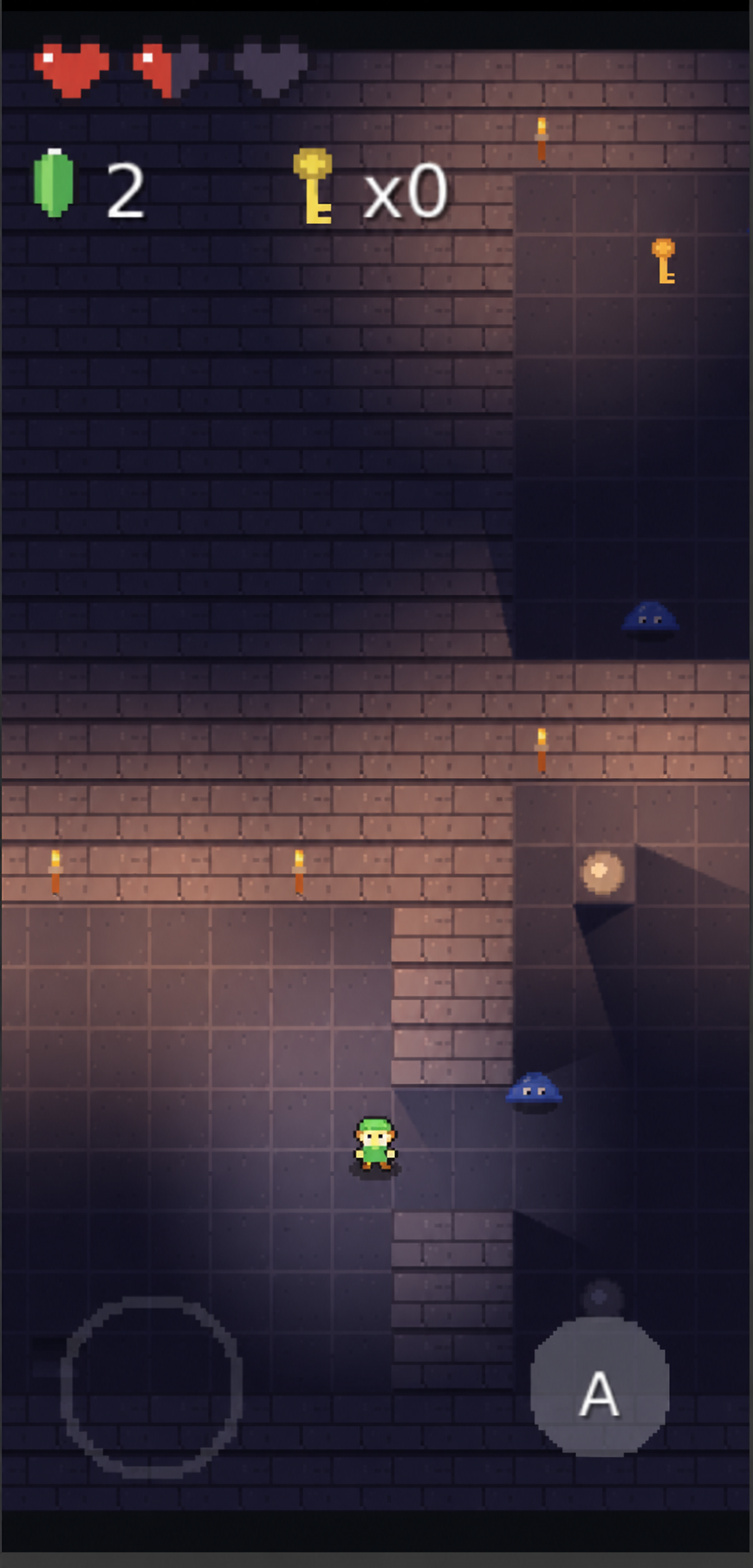
Caster edges feed a visibility atlas. The lit-sprite program samples the selected light tile before applying the light to a sprite. Shadows are hard-edged. Turning shadows off preserves normal light attenuation and removes caster occlusion.
ShadowCaster2D and TilemapShadowCaster2D→visibility atlas→lit-sprite program→lit sprites
2D Materials and Rendering
Source-confirmed 2D API reference.
new_sprite_material
Creates the transparent 2D material state used by sprites and masks.
new_sprite_material(tex: Optional[TextureAsset], lit: bool = False, shader: Optional[str] = None, mask: int = 0) -> Material
Import from components.extras.engine3d.sprites2d.
Parameter
Type
Default
Meaning
tex
TextureAsset | None
Required
Base texture.
lit
bool
False
Selects c3d/sprite2d_lit instead of c3d/sprite2d.
shader
str | None
None
Program override.
mask
int
0
MASK_NONE, MASK_WRITE, MASK_INSIDE, or MASK_OUTSIDE.
Sprite programs
Public program names used by new_sprite_material.
c3d/sprite2d and c3d/sprite2d_lit
Import from components.extras.engine3d.programs.
Mask constants
Selects normal drawing, stencil writing, inside testing, or outside testing.
Maximum number of selected lit lights and shadowing lights prepared for one 2D view.
MAX_LIGHTS = 8
Import from components.extras.engine3d.sprites2d.
Attribute or property
Type
Default
Meaning
MAX_LIGHTS
int
8
2D light selection limit.
Custom Components
Custom Components let you package reusable UI plus logic into a standalone unit (a subclass of Component) and embed it as a custom XML tag inside any app. This section walks through authoring the component, declaring it with components.yaml, embedding it in .asxml, and testing it standalone, using a fictional StarRating widget consumed by a BookReviews app as the running example.
Overview
A Custom Component is a self-contained, reusable unit that bundles its own ASXML layout, Python logic, and configurable attributes. Once authored, any app can drop it into a view as if it were a built-in component.
The running example is StarRating, a small star-based rating widget. The BookReviews app declares it in components.yaml, then uses it inline:
<StarRating id="rating" max="5" current-value="3" label="Rate this book" />
The same widget works in any other app that adds starrating to its components.yaml. No copy-pasting, no shared code, no rebuilding.
Folder Layout
Custom Components live under a global components directory (alongside your apps directory). The folder structure mirrors a normal app, with one important difference: the entry class subclasses Component, and the metadata.json has scope: "thirdparty". The component folder name must follow the same naming rules as apps: all lowercase with no spaces, hyphens, underscores, or special characters.
The component's entry file defines a subclass of Component (imported from appsudo). The class is paired with a plain Python data holder, inflates its own ASXML view, and exposes configurable instance attributes that become the component's public XML surface.
The first argument is the XML tag name consumers use to embed the component (<StarRating /> in this case).
Inflate a view
Use ViewInflater(self).inflate("view_name", data) to load the component's own ASXML layout from its view/ folder.
Expose configurable attributes
Instance attributes set in __init__ become the component's public XML attributes. Consumers can set them via XML or programmatically after find_element_by_id.
Define event handlers
Methods like on_star_click are referenced from the component's ASXML via on-click="on_star_click", the same way apps wire handlers.
Use a Data class
Pair the component with a plain Python data class (e.g., StarRatingData) that the view binds against via {data.field_name}.
components.yaml
To use a Custom Component, the consumer app declares it in a top-level components.yaml file. The framework reads this manifest at startup, locates each named component in the components registry, and makes its XML tag available to every .asxml view in the app.
The consumer app's components.yaml:
components:
  - name: starrating
    version: 1.0.0
Manifest Fields
componentslist
Top-level array. Each entry declares one Custom Component dependency.
namestring
Folder name of the component under the global components directory. Resolves to /appsudo-components/<name>/.
versionstring
Version requirement. Pin to a known-good version for stability.
Embedding
Once the component is declared in components.yaml, embed it like any other view. Set its attributes inline, bind to data fields with {data.field}, and give it an id so you can retrieve the instance from Python.
A consumer's review_form.asxml mixing the custom StarRating with built-in views:
<VerticalView width="fill" height="fill" padding="15dp">
  <Label text="How was the book?" margin-bottom="10dp" />

  <StarRating id="rating"
              max="5"
              current-value="{data.last_rating}"
              label="Rate this book" />

  <TextBox id="review_text" placeholder="Write your review..." />
  <Button text="Submit" on-click="on_submit_review" />
</VerticalView>
Public Attributes
idstring
Identifier for find_element_by_id lookup.
maxnumber
Total number of stars to render.
current-valuenumber | {data.field}
Initial selected rating (between 0 and max). Accepts a data binding.
labelstring
Optional caption rendered above the stars.
on-ratecallback name
Python handler invoked when the user taps a star. Signature: def handler(component, value): ....
Programmatic Access
find_element_by_id returns the live component instance, so you can set callbacks or read state after inflation:
While developing a Custom Component you usually want to run it on its own without writing a full host app. The convention is to ship a thin App wrapper inside the component folder that instantiates the component, configures test values, and renders it. You then launch that wrapper through the existing VS Code Appsudo App Runner command (see Setup > Step 4).
A minimal starrating_app.py placed next to starrating.py:
from appsudo import App
from starrating import StarRatingComponent


class StarRatingApp(App):
    def __init__(self, application_path):
        App.__init__(self, "StarRating", application_path)
        self.component = StarRatingComponent(application_path)
        self.component.max = 5
        self.component.current_value = 3
        self.component.label = "Try the widget"

    def setup(self):
        self.ui_view = self.component.ui_view

    def run(self):
        super().run()
        self.render(self.ui_view.render())
Workflow
1. Open the component folder in VS Code
Treat the component folder as if it were an app project.
2. Press Cmd/Ctrl + Shift + P
Open the command palette and run Appsudo App Runner.
3. Select a device
Pick the target Android device or emulator.
4. Tweak values in the App wrapper
Update the test attributes (max, current_value, label) and re-run to iterate.
LLM Development
Appsudo provides plain-text framework references that you can give to a coding agent before it creates or changes a mini app. The complete reference covers project structure, ASXML, components, framework APIs, app patterns, and working examples.
Start Here
For a new mini app, start with the complete reference at /doc/llms.txt. It is self-contained, so the agent can use one file while planning the project and writing its files.
Download the file, attach it to the conversation, or paste its contents before describing the task.
Recommended Workflow
Give the reference and the project brief in the same conversation. Ask for a project tree before implementation so you can confirm the planned files and app type.
Prompt Template
Read https://appsudo.com/doc/llms.txt before writing code.
Use it as the source of truth for Appsudo project structure and framework APIs.

Build this mini app:
[Describe the app, screens, behavior, and data.]

First return the proposed project tree. Then provide the complete contents of every file.
Follow Appsudo naming, metadata, state binding, component, and single-render rules.
Do not invent undocumented APIs. If the reference does not cover something required,
identify the missing information before continuing.
Review the Result
1. Check the project tree
Confirm the entry Python file, metadata, views, styles, resources, and optional data files match the selected app type.
2. Check framework usage
Compare imports, component attributes, callbacks, state bindings, and lifecycle methods with the reference.
3. Run the mini app
Use Appsudo App Runner on a device or emulator. Fix runtime and layout issues before publishing.
Write a Useful Project Brief
Include the details below so the agent can choose the correct Appsudo pattern and produce a complete project.
Purpose and app type
Describe what the mini app does and whether it is an ASXML app, Pygame mini game, HTML mini app, or reusable custom component.
Screens and behavior
List the screens, navigation, user actions, validation rules, empty states, and error states.
Data and services
State what must persist, which network services are used, and what should work without a connection.
Output
Request complete file contents, setup instructions, test steps, and a list of any assumptions.
Reference Files
Use the complete reference for new projects or work that crosses several framework areas. For a limited task, choose the focused file mapped to the relevant documentation section below.
Complete Appsudo reference
/doc/llms.txt contains every major documentation section in one file.
Bringing an existing pure-pygame program into Appsudo as a mini-game is largely mechanical: most of your code keeps working as-is. Appsudo ships a near-complete pygame subset under components.extras.game, exposed as the regular pygame module. The migration is mostly about wrapping the game in an App, replacing the standalone main() loop with a GameWindow subclass that draws to an Appsudo Canvas, and adjusting input handling for the overlay game controller used on mobile.
Overview
A mini-game is a pygame-driven Appsudo app whose frame loop is owned by GameWindow and whose drawing surface is an Appsudo Canvas. Game logic (sprites, physics, collisions, particles) does not change; only the outer scaffolding does.
Most pygame code works unchanged.import pygame works as in any pygame project, and every pygame class and function you are used to is available. Calls that are not fully wired (for example, some pygame.mixer controls) no-op rather than raise, so games can be ported incrementally without first stubbing out unsupported APIs.
Migration Checklist
Every mechanical change at a glance. The sections that follow expand on each row with a small before/after.
Pure pygame
Appsudo mini game
Why
import pygame
import pygame(unchanged)
Appsudo's pygame subset is exposed as the regular pygame module.
pygame.init(), pygame.mixer.init()
Safe to call but unnecessary
GameWindow initialises display; pygame.mixer.init() is a no-op because Appsudo manages audio on demand.
Standalone def main(): while running:
class MyGame(GameWindow): def on_draw(self, canvas):
GameWindow owns the frame loop; it calls on_draw per frame.
Module-level globals (SCREEN_WIDTH, colours…)
Instance attributes on the GameWindow subclass (self.SCREEN_WIDTH, …)
Mini-games are instantiated by the App; instance state is cleaner than module-level state.
screen = pygame.display.set_mode(...) drawn to globally
canvas parameter passed into on_draw
The Appsudo Canvas component owns the surface; you draw onto whatever canvas is handed to you.
K_UP/DOWN/LEFT/RIGHT, K_p, K_r
K_DPAD_UP/DOWN/LEFT/RIGHT, K_BUTTON_START (keyboard keys still fire during desktop dev)
Mobile users press an overlay game controller, not a keyboard.
running = False
self.set_running(False)
GameWindow exposes the loop flag.
pygame.quit() at end of main()
(remove)
The App framework tears down via on_close().
(new)App subclass wrapping the game
class MyGameApp(App) with setup(), run(), play(), get_shareable(), on_close()
Every mini-game ships as an App so the platform can launch, render, and share it.
File I/O for high-score
Optionally DataStore from runtime.DataStore
Persistent, Appsudo-managed storage. See DataStore.
1. Imports
Keep your existing pygame imports untouched. Add only the Appsudo modules you actually use: the App base class, the Canvas component, and the GameWindow base class for the game loop.
Before
import pygame
import random
import math
After
from appsudo import App
from components.canvas import Canvas
from components.extras.game.window import GameWindow

import pygame
import random
import math
2. Wrap the game in an App
Every mini-game ships as an App subclass that owns a Canvas view and the GameWindow subclass. The wrapper is a small, predictable skeleton.
Move your main() body into a subclass of GameWindow. GameWindow owns the frame loop and calls your on_draw(canvas) method every frame. The canvas argument is what you previously called screen.
Before
screen = pygame.display.set_mode((SCREEN_WIDTH, SCREEN_HEIGHT))
clock = pygame.time.Clock()

def main():
    running = True
    while running:
        for event in pygame.event.get():
            ...
        screen.fill(COLOR_BACKGROUND)
        snake.draw(screen)
        pygame.display.flip()
        clock.tick(game_speed)
4. Compose regular UI alongside the Canvas (optional)
This step is optional. Most mini-games render their entire UI inside the Canvas itself using pygame draw calls for the score, HUD, pause menu, and game-over screen, exactly as the original pygame program did. The skeleton in step 2, which simply renders Canvas() as the app's view, is enough for the majority of migrated games and is the recommended starting point.
If you do want to combine the canvas with native Appsudo UI components (e.g. a system Button for a settings sheet that lives outside the game surface), the standard ViewInflater + .asxml workflow works the same way it does for any other app. See the Components reference and the App Structure example. Do not feel obligated to introduce native UI just because it is possible.
5. Input: gamepad on mobile, keyboard for local dev
On mobile, players interact through an overlay game controller: either one of the built-in controller components or one your app provides itself. Desktop machines running the Appsudo Runner locally additionally forward WASD and arrow keys, but that path is for development only; production input on mobile flows through the overlay controller.
Pure pygame
Mini game
Purpose
K_UP / K_w
K_DPAD_UP (+ K_w during local dev)
Up
K_DOWN / K_s
K_DPAD_DOWN (+ K_s during local dev)
Down
K_LEFT / K_a
K_DPAD_LEFT (+ K_a during local dev)
Left
K_RIGHT / K_d
K_DPAD_RIGHT (+ K_d during local dev)
Right
K_p
K_BUTTON_START
Pause / resume
K_r (game-over restart)
K_BUTTON_START
Restart
running = False
self.set_running(False)
Quit
Before
for event in pygame.event.get():
    if event.type == pygame.QUIT:
        running = False
    if event.type == pygame.KEYDOWN:
        if event.key == pygame.K_ESCAPE:
            running = False
        elif event.key == pygame.K_p:
            paused = not paused
        elif event.key in [pygame.K_UP, pygame.K_w]:
            snake.turn((0, -1))
After
for event in pygame.event.get():
    if event.type == pygame.QUIT:
        self.set_running(False)
    if event.type == pygame.KEYDOWN:
        if event.key == pygame.K_ESCAPE:
            self.set_running(False)
        elif event.key == pygame.K_BUTTON_START:
            self.toggle_pause()
        elif event.key in [pygame.K_DPAD_UP, pygame.K_w]:
            self.snake.turn((0, -1))
6. Sound
pygame.mixer.Sound works like normal pygame. Build sounds the same way you would in pygame. No Appsudo-specific changes needed.
def generate_sound(frequency=440, duration=0.1):
    sample_rate = pygame.mixer.get_init()[0]
    max_amplitude = 2 ** (pygame.mixer.get_init()[2] - 1) - 1
    n_samples = int(round(duration * sample_rate))
    buf = bytearray([0] * (n_samples * 2))
    for i in range(n_samples):
        value = int(round(max_amplitude * math.sin(2 * math.pi * frequency * i / sample_rate)))
        buf[i*2] = value & 0xFF
        buf[i*2+1] = (value >> 8) & 0xFF
    return pygame.mixer.Sound(buf)

sound_eat = generate_sound(660, 0.08)
sound_eat.play()
7. Persistence
Plain file I/O works, but the Appsudo idiom for app-scoped persistence is DataStore.
Before
try:
    with open("highscore.txt", "r") as f:
        self.high_score = int(f.read())
except (FileNotFoundError, ValueError):
    self.high_score = 0

# later
with open("highscore.txt", "w") as f:
    f.write(str(self.high_score))
After
self.high_score = DataStore.get("highscore", default=0)

# later
DataStore.put("highscore", self.high_score)
8. Conventions to follow
These rules apply to mini-games like any other Appsudo app.
One render per app: self.render(...) exactly once, inside run() or a helper it invokes. See App Conventions.
App-Structure layout: same metadata.json / data/ / res/ / view/ folder shape as any other app. See App Structure.
Canvas is the game surface: never bind to pygame.display.set_mode results directly; draw onto the canvas passed into on_draw. See Canvas.
Frame end: call pygame.display.flip() and self.clock.tick(speed) at the bottom of on_draw.
Mobile input via overlay controller; WASD and arrows are dev-only. Use InputManager to ship a custom on-screen controller.
get_shareable() only gates posting to the feed and DM; the app remains searchable and usable regardless.
Compose regular UI alongside the Canvas for scoreboards, menus, settings. See Components.
Reference: the Tetris Game example shows all of the above in one place.
Canvas3D Game
Build a direct Canvas3D game with the complete CubeGfx example, lifecycle rules, and links to the structured foundation reference.
Overview
Canvas3D records drawing commands in Python. The SDK draws those commands. A game needs a Canvas3D, a GameWindow3D subclass, and the Device passed to its callbacks.
Rules to follow
Create every resource in on_create and destroy it in on_destroy. on_create can run again, and earlier resources are then invalid.
Record drawing only inside one with gfx.frame(...) block per on_draw tick.
Pipelines compile asynchronously. Check pipeline.ready, use the boolean returned by draw calls, or call gfx.warmup(...). Inspect pipeline.failed and pipeline.error when compilation fails.
File textures load asynchronously. Check texture.ready or use texture.on_ready(...) when readiness matters.
Buffer data must be array.array, bytes, or bytearray. Plain lists raise GfxError.
Use 16-bit indices for at most 65536 vertices and 32-bit indices for larger meshes.
A vertex layout must provide every attribute read by the shader at the fixed STANDARD_LOCATIONS. Its stride must match the data.
Uniform names, order, and types must match the shader block exactly. A vec3 consumes 16 bytes of alignment in std140.
Pass zero_to_one=gfx.clip_zero_to_one to projection builders, rebuild projection matrices in on_resize, and combine matrices as projection @ view @ model.
Set MSAA, depth bits, stencil, transparency, debug, and the app directory before the canvas is first shown.
Touch coordinates and surface sizes are pixels. Read the current width and height.
Custom shaders must include the GLSL pair and the msl source, with equivalent results.
Textures use straight alpha. Use Blend.alpha() for normal transparency. Draw opaque geometry first, then transparent geometry with depth_write=False.
Release resources with destroy(). Using a destroyed resource raises GfxError.
Frame clear colors use values from 0 to 1.
Draw-call order determines drawing order. There is no sorting or scene graph.
Imports
Canvas3D games use these SDK namespaces:
from appsudo import App
from components.canvas3d import Canvas3D
from components.extras.game3d.window import GameWindow3D, Touch, TouchEvent
from components.extras.gfx import BufferUsage, VertexLayout
from components.extras.math3d import Mat4, Vec3
Quick start: CubeGfx
The example expects res/textures/crate.png inside the app directory.
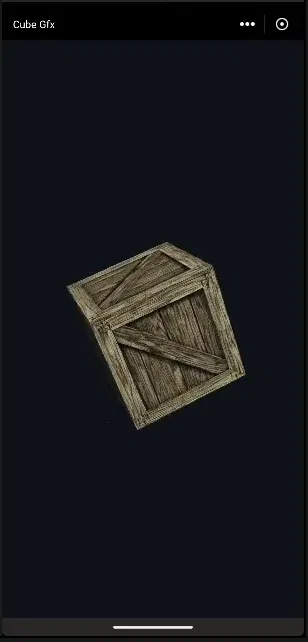
Expected CubeGfx result.
from array import array
from appsudo import App
from components.canvas3d import Canvas3D
from components.extras.game3d.window import GameWindow3D, Touch
from components.extras.gfx import VertexLayout, BufferUsage
from components.extras.math3d import Mat4, Vec3


def make_cube():
    verts, idx = [], []
    faces = [((0, 0, 1), (1, 0, 0), (0, 1, 0)),
             ((0, 0, -1), (-1, 0, 0), (0, 1, 0)),
             ((1, 0, 0), (0, 0, -1), (0, 1, 0)),
             ((-1, 0, 0), (0, 0, 1), (0, 1, 0)),
             ((0, 1, 0), (1, 0, 0), (0, 0, -1)),
             ((0, -1, 0), (1, 0, 0), (0, 0, 1))]
    for n, u, v in faces:
        base = len(verts) // 8
        for su, sv, tu, tv in ((-1, -1, 0, 1), (1, -1, 1, 1), (1, 1, 1, 0), (-1, 1, 0, 0)):
            pos = [(n[i] + su * u[i] + sv * v[i]) * 0.5 for i in range(3)]
            verts += pos + list(n) + [tu, tv]
        idx += [base, base + 1, base + 2, base, base + 2, base + 3]
    return array("f", verts), array("H", idx)


class CubeGfx(GameWindow3D):
    def __init__(self, canvas, application_path):
        super().__init__(canvas)
        self.path = application_path
        self.yaw, self.pitch, self.last_touch = 30.0, 20.0, None
        self.projection = self.view = None

    def on_create(self, gfx):
        verts, indices = make_cube()
        self.index_count = len(indices)
        self.pipeline = gfx.pipeline(
            shader="builtin/lit_textured",
            vertex=VertexLayout(position="f32x3", normal="f32x3", uv="f32x2"),
            depth=True, cull="back", blend=None,
            color_format=gfx.surface_format)
        self.vbo = gfx.buffer(verts, BufferUsage.VERTEX)
        self.ibo = gfx.buffer(indices, BufferUsage.INDEX)
        self.uniforms = gfx.uniforms(mvp="mat4", model="mat4", light_dir="vec3")
        self.texture = gfx.texture_from_file("res/textures/crate.png", mipmaps=True)
        self.bindings = gfx.bind(self.pipeline, uniforms=self.uniforms, tex=self.texture)
        self.view = Mat4.look_at(Vec3(0, 1.5, 4), Vec3(0, 0, 0), Vec3(0, 1, 0))
        self.projection = Mat4.perspective(60.0, gfx.aspect, 0.1, 100.0, zero_to_one=gfx.clip_zero_to_one)
        gfx.warmup([self.pipeline])

    def on_resize(self, gfx, width, height):
        self.projection = Mat4.perspective(60.0, width / height, 0.1, 100.0, zero_to_one=gfx.clip_zero_to_one)

    def on_draw(self, gfx, dt):
        if not self.pipeline.ready:
            return
        if self.last_touch is None:
            self.yaw += 40.0 * dt
        model = Mat4.rotation_y(self.yaw) @ Mat4.rotation_x(self.pitch)
        self.uniforms.set(mvp=self.projection @ self.view @ model,
                          model=model,
                          light_dir=(-0.4, -0.8, -0.5))
        with gfx.frame(clear=(0.05, 0.07, 0.10, 1.0)) as frame:
            frame.draw_indexed(self.pipeline, self.bindings,
                               self.vbo, self.ibo, self.index_count)

    def on_touch(self, action, x, y):
        if action == Touch.DOWN:
            self.last_touch = (x, y)
        elif action == Touch.MOVE and self.last_touch:
            self.yaw += (x - self.last_touch[0]) * 0.5
            self.pitch += (y - self.last_touch[1]) * 0.5
            self.last_touch = (x, y)
        elif action in (Touch.UP, Touch.CANCEL):
            self.last_touch = None

    def on_destroy(self, gfx):
        for name in ("vbo", "ibo", "texture", "uniforms", "pipeline"):
            res = getattr(self, name, None)
            if res is not None:
                res.destroy()


class CubeGfxApp(App):
    def __init__(self, application_path):
        App.__init__(self, "CubeGfx", application_path)
        self.setup()

    def setup(self):
        self.ui_view = Canvas3D()
        self.ui_view.set_app_dir(self.application_path)
        self.game = CubeGfx(self.ui_view, self.application_path)

    def run(self):
        App.run(self)
        self.render(self.ui_view.render())

    def get_gamepad(self):
        return None

    def on_close(self):
        self.game.destroy()
make_cube() writes eight floats per vertex: three for position, three for normal, and two for UV. That matches the VertexLayout exactly. array("H") stores 16-bit indices, which is enough for this 24-vertex mesh. on_create creates all resources and can safely replace them after recreation. on_resize rebuilds the projection for the current aspect ratio. on_draw returns until the pipeline is ready, advances rotation using dt, updates uniforms, and records one frame. Touch drags update yaw and pitch in pixels. on_destroy releases each owned resource.
Important things to note
Create every resource in on_create and destroy it in on_destroy. on_create can run again, and earlier resources are then invalid.
Record drawing only inside one with gfx.frame(...) block per on_draw tick.
Pipelines compile asynchronously. Check pipeline.ready, use the boolean returned by draw calls, or call gfx.warmup(...). Inspect pipeline.failed and pipeline.error when compilation fails.
File textures load asynchronously. Check texture.ready or use texture.on_ready(...) when readiness matters.
Buffer data must be array.array, bytes, or bytearray. Plain lists raise GfxError.
Use 16-bit indices for at most 65536 vertices and 32-bit indices for larger meshes.
A vertex layout must provide every attribute read by the shader at the fixed STANDARD_LOCATIONS. Its stride must match the data.
Uniform names, order, and types must match the shader block exactly. A vec3 consumes 16 bytes of alignment in std140.
Pass zero_to_one=gfx.clip_zero_to_one to projection builders, rebuild projection matrices in on_resize, and combine matrices as projection @ view @ model.
Set MSAA, depth bits, stencil, transparency, debug, and the app directory before the canvas is first shown.
Touch coordinates and surface sizes are pixels. Read the current width and height.
Custom shaders must include the GLSL pair and the msl source, with equivalent results.
Textures use straight alpha. Use Blend.alpha() for normal transparency. Draw opaque geometry first, then transparent geometry with depth_write=False.
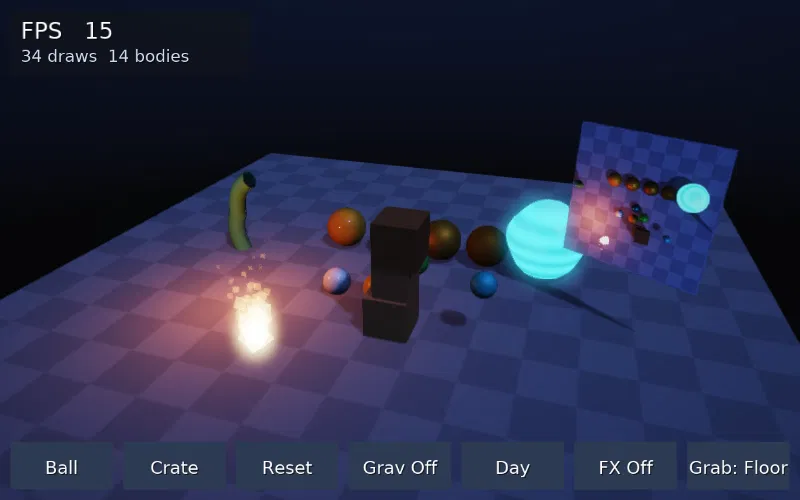
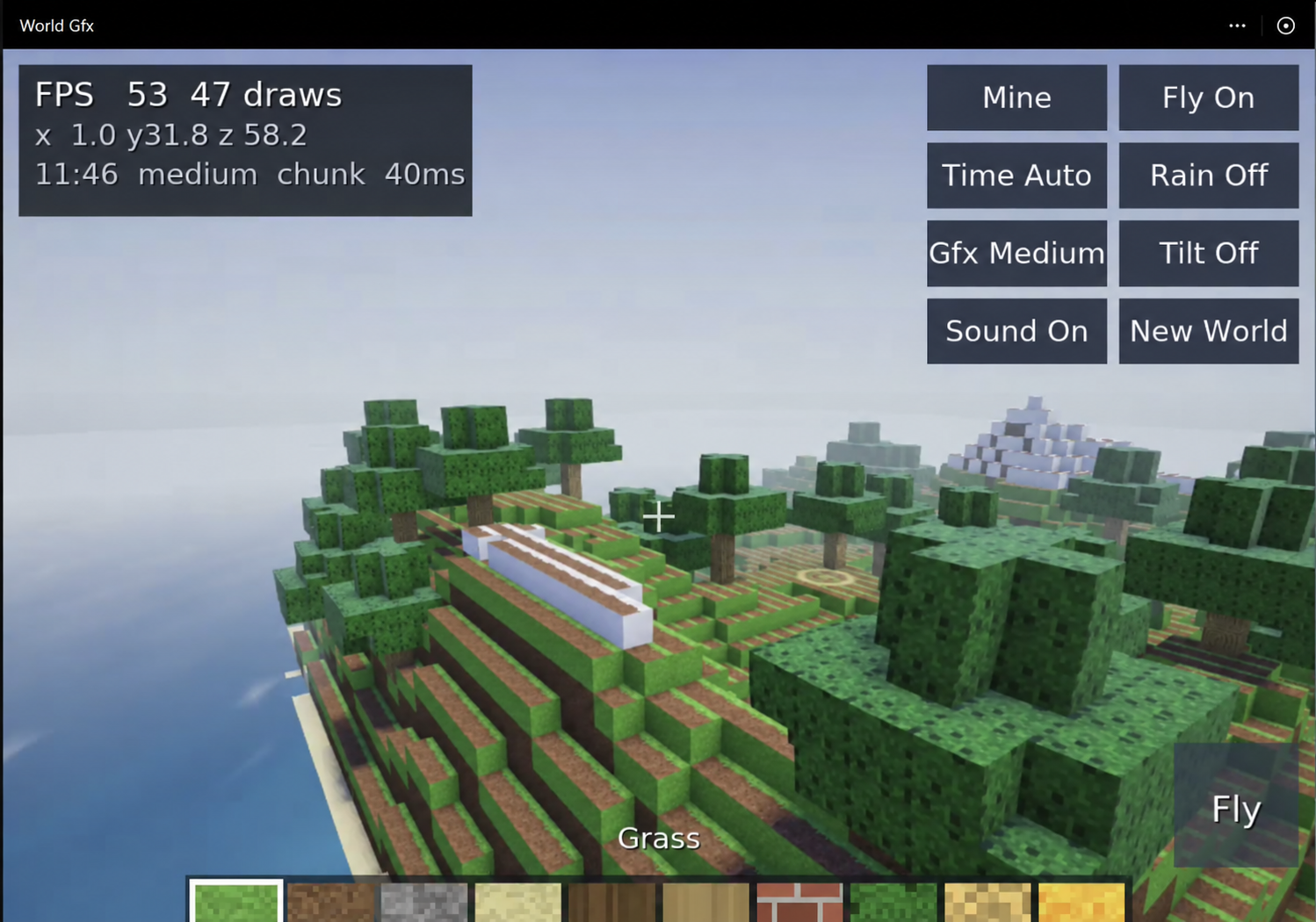
envgfx demonstrates a compact interactive physics scene. worldgfx demonstrates a generated voxel world with staged loading, environment effects, audio, input, and a HUD.
Example: envgfx
envgfx is an interactive sandbox. The user can drag objects, release while moving to throw, tap an object to pop it upward, drag empty space to orbit, and pinch to zoom. Its seven buttons are Ball, Crate, Reset, Grav On or Off, Night or Day, FX On or Off, and Grab Floor or Free. Controller shortcuts are A for ball, X for crate, B for gravity, Y for light, Select for effects, Start for reset, right stick for orbit, and triggers for zoom.
Folder structure
The host entry file creates the canvas, sets its app directory, target frame rate and multisampling, builds the scene window, exposes get_gamepad, and cleans up on close. In metadata.json, icon names the logo file, type declares an app, tags categorizes it as a game, author supplies the author name, displayName supplies the visible title, scope marks the app as system scoped, and version identifies the release. Logo files provide app artwork. The env package separates world construction, interaction, shader packages, and generated model data so each concern can be changed independently.
envgfx.py
from appsudo import App
from components.canvas3d import Canvas3D
from env.world import EnvScene


class EnvGfxApp(App):
    def __init__(self, application_path):
        App.__init__(self, "EnvGfx", application_path)
        self.setup()

    def setup(self):
        self.ui_view = Canvas3D()
        self.ui_view.set_app_dir(self.application_path)
        self.ui_view.set_target_fps(60)
        self.ui_view.set_msaa(4)
        self.world = EnvScene(self.ui_view, self.application_path)

    def get_gamepad(self):
        return None

    def on_close(self):
        self.world.destroy()
import json
import math
import struct


def build_tube_glb():
    rings, seg, height = 18, 14, 2.0
    pos, nor, uv, joints, weights = [], [], [], [], []
    for r in range(rings + 1):
        y = r / rings * height
        for s in range(seg + 1):
            a = s / seg * math.tau
            x, z = math.cos(a) * 0.22, math.sin(a) * 0.22
            pos += [x, y, z]
            nor += [math.cos(a), 0.0, math.sin(a)]
            uv += [s / seg, 1.0 - r / rings]
            t = y / (height / 2.0)
            j = min(int(t), 1)
            f = t - j
            joints += [j, j + 1, 0, 0]
            weights += [1.0 - f, f, 0.0, 0.0]
    idx = []
    row = seg + 1
    for r in range(rings):
        for s in range(seg):
            a, b, c, d = r * row + s, r * row + s + 1, (r + 1) * row + s, (r + 1) * row + s + 1
            idx += [a, b, c, b, d, c]
    n = len(pos) // 3
    blob = bytearray()
    views = []

    def add(data, target=None):
        while len(blob) % 4:
            blob.append(0)
        off = len(blob)
        blob.extend(data)
        views.append({"buffer": 0, "byteOffset": off, "byteLength": len(data), **({"target": target} if target else {})})
        return len(views) - 1

    vp = add(struct.pack(f"<{len(pos)}f", *pos), 34962)
    vn = add(struct.pack(f"<{len(nor)}f", *nor), 34962)
    vu = add(struct.pack(f"<{len(uv)}f", *uv), 34962)
    vj = add(bytes(int(v) for v in joints), 34962)
    vw = add(struct.pack(f"<{len(weights)}f", *weights), 34962)
    vi = add(struct.pack(f"<{len(idx)}H", *idx), 34963)
    ibm = []
    joint_y = [0.0, 1.0, 2.0]
    for y in joint_y:
        ibm += [1, 0, 0, 0, 0, 1, 0, 0, 0, 0, 1, 0, 0, -y, 0, 1]
    vb = add(struct.pack(f"<{len(ibm)}f", *ibm))
    times = [0.0, 0.5, 1.0, 1.5, 2.0]
    q = lambda deg: (0.0, 0.0, math.sin(math.radians(deg) / 2), math.cos(math.radians(deg) / 2))
    r1 = sum((q(d) for d in (0, 35, 0, -35, 0)), ())
    r2 = sum((q(d) for d in (0, 50, 0, -50, 0)), ())
    vt = add(struct.pack("<5f", *times))
    vr1 = add(struct.pack(f"<{len(r1)}f", *r1))
    vr2 = add(struct.pack(f"<{len(r2)}f", *r2))
    mn = [min(pos[i::3]) for i in range(3)]
    mx = [max(pos[i::3]) for i in range(3)]
    acc = [
        {"bufferView": vp, "componentType": 5126, "count": n, "type": "VEC3", "min": mn, "max": mx},
        {"bufferView": vn, "componentType": 5126, "count": n, "type": "VEC3"},
        {"bufferView": vu, "componentType": 5126, "count": n, "type": "VEC2"},
        {"bufferView": vj, "componentType": 5121, "count": n, "type": "VEC4"},
        {"bufferView": vw, "componentType": 5126, "count": n, "type": "VEC4"},
        {"bufferView": vi, "componentType": 5123, "count": len(idx), "type": "SCALAR"},
        {"bufferView": vb, "componentType": 5126, "count": 3, "type": "MAT4"},
        {"bufferView": vt, "componentType": 5126, "count": 5, "type": "SCALAR", "min": [0.0], "max": [2.0]},
        {"bufferView": vr1, "componentType": 5126, "count": 5, "type": "VEC4"},
        {"bufferView": vr2, "componentType": 5126, "count": 5, "type": "VEC4"},
    ]
    doc = {
        "asset": {"version": "2.0", "generator": "envgfx"},
        "scene": 0, "scenes": [{"nodes": [0, 3]}],
        "nodes": [
            {"name": "j0", "children": [1]},
            {"name": "j1", "translation": [0, 1, 0], "children": [2]},
            {"name": "j2", "translation": [0, 1, 0]},
            {"name": "tube", "mesh": 0, "skin": 0},
        ],
        "meshes": [{"primitives": [{"attributes": {"POSITION": 0, "NORMAL": 1, "TEXCOORD_0": 2, "JOINTS_0": 3, "WEIGHTS_0": 4}, "indices": 5, "material": 0}]}],
        "materials": [{"name": "skin", "pbrMetallicRoughness": {"baseColorFactor": [0.2, 0.7, 0.3, 1.0], "metallicFactor": 0.0, "roughnessFactor": 0.45}, "doubleSided": True}],
        "skins": [{"joints": [0, 1, 2], "inverseBindMatrices": 6}],
        "animations": [{"name": "wave", "channels": [
            {"sampler": 0, "target": {"node": 1, "path": "rotation"}},
            {"sampler": 1, "target": {"node": 2, "path": "rotation"}}],
            "samplers": [{"input": 7, "output": 8, "interpolation": "LINEAR"}, {"input": 7, "output": 9, "interpolation": "LINEAR"}]}],
        "accessors": acc, "bufferViews": views, "buffers": [{"byteLength": len(blob)}],
    }
    js_ = json.dumps(doc).encode()
    while len(js_) % 4:
        js_ += b" "
    while len(blob) % 4:
        blob.append(0)
    total = 12 + 8 + len(js_) + 8 + len(blob)
    return struct.pack("<III", 0x46546C67, 2, total) + struct.pack("<II", len(js_), 0x4E4F534A) + js_ + struct.pack("<II", len(blob), 0x004E4942) + bytes(blob)
env/world.py walkthrough
EnvScene subclasses EngineWindow. setup registers shader packages, builds the scene, and adds GUI. build creates the procedural sky, a standard post stack plus scanline effect, an orbit camera, a shadow-casting sun, a warm point light, a generated checkered floor, invisible wall colliders on layer 3, gold spheres, a hologram material, an in-memory skinned model, fire particles, a target camera and monitor, and starting crates and balls. The monitor is on layer 5 and its camera clears that bit, so the camera cannot see its own surface.
spawn_ball and spawn_crate randomize size, color, mass, material, collider, and body. track limits spawned objects to 40 and destroys the oldest. reset cancels interaction, creates a new scene, and rebuilds. Toggle methods change gravity, sky and light, effect enabled state, and drag plane mode. layout adapts the seven-button bar to the current pixel size. in_ui identifies reserved pointer areas. button draws and hit tests one control. draw_gui draws the HUD and buttons. gamepad_actions maps one-tick controller edges to actions.
env/interact.py walkthrough
Interaction.execution_order is -50, so it reserves UI pointers and applies drag work early. A press outside UI casts a camera ray through the pointer and queries physics with a mask that excludes wall layer 3. A Held record stores body, pointer, hit offset, drag plane, timing, gravity, and temporary material state.
Floor mode intersects the ray with a horizontal plane. Free mode intersects it with a plane facing the camera. The component calculates the ray distance to that plane, subtracts the original hit offset, clamps the target inside the arena, and sets a spring-style velocity toward it. This keeps collision response active. Speed is capped at 16. Gravity is disabled while held and restored on release. A quick release within 0.25 seconds and 14 movement units applies an upward impulse. Other releases keep a capped throw velocity. Materials with an emissive property receive a temporary highlight. cancel and on_destroy clear held state safely.
env/shaders.py and env/models.py
env/shaders.py defines a PBR surface package and an LDR post package as Python dictionaries. packages() serializes both so assets.shader_text can register them. env/models.py builds a GLB byte sequence with positions, normals, UVs, four joint indices and weights, indices, three inverse bind matrices, and two rotation animation channels. load_gltf reads those bytes. instantiate builds nodes and a skinned renderer. The attached Animator plays wave.
Patterns to reuse
Pattern
File and function
Pointer reservation for UI
env/interact.py, Interaction.update
Picking and dragging
env/interact.py, _grab and _drag
Throw
env/interact.py, _release
Tap action
env/interact.py, _release
Spawn with limit
env/world.py, track, spawn_ball, spawn_crate
Reset by rebuilding
env/world.py, reset
Day and night switch
env/world.py, toggle_light
Render texture monitor
env/world.py, build
Custom effect toggle
env/world.py, toggle_fx
Controller shortcuts
env/world.py, gamepad_actions
In-memory model
env/models.py, build_tube_glb
Generated texture
env/world.py, checker_texture
Extending the app
Add a trigger collider as a delete zone and destroy entering spawned nodes.
Raycast empty-space taps to a floor plane and spawn at the intersection.
Register custom components and save the current layout with scene serialization.
Add a second target camera and another monitor layer.
Register the toon package from Custom Shader Packages and add a material toggle.
Testing the app logic without a screen
Create an Engine, a camera, floor, sphere collider, and rigid body. Add Interaction with a small fake window that supplies camera, gravity_on, and in_ui. For each step, call input.begin_frame, the fixed update, physics.step, scene.update, and input.end_frame. Feed touch down at the sphere's projected pixel position, feed moves, then feed up. Assert that held was set, the body followed the pointer, and held became None after release.
Example: worldgfx
worldgfx is a voxel sandbox built from a block table, generated texture atlas, deterministic voxel data, chunk meshes, a player controller, a day and night cycle, weather, audio, and a pixel-based HUD.
worldgfx combines voxel terrain, environment effects, input, audio, and an overlay HUD.
Architecture
world/blocks.py defines blocks and builds the texture atlas.
world/voxels.py generates terrain, caves, water regions, trees, and dirty chunk tracking.
world/mesher.py removes hidden faces, bakes ambient occlusion, and emits solid, leaves, and glow meshes.
world/player.py owns movement, look, collisions, mining, placing, and input.
world/scene.py stages loading, creates effects, updates weather, remeshes dirty chunks, and draws the HUD.
world/shaders.py defines leaves, glow, and underwater packages.
world/sounds.py owns output, clips, music, spatial mode, and filters.
if self.underwater:
    sc.fog_mode, sc.fog_color, sc.fog_density = "exp2", "#0b4560", 0.085
else:
    sc.fog_mode, sc.fog_start, sc.fog_end = "linear", 40.0 if not self.raining else 20.0, base
def underwater(self, on):
    if self.ready:
        self.engine.audio.set_bus_filter("music", lowpass=600.0 if on else None)
        self.engine.audio.set_bus_filter("sfx", lowpass=900.0 if on else None)
Process generation and mesh tasks under a small per-frame time budget.
Mark changed chunks dirty and rebuild only those chunks.
Split solid, leaves, and emissive geometry by material.
Compare a low-frequency sky key before replacing ProceduralSky.
Combine fog, post parameters, and audio filters for environment transitions.
Canvas3D + 2D Engine
Build a sprite and tilemap game with the engine 2D layer, using rpg2d as the worked example.
rpg2d overview
rpg2d is a top-down action game with generated pixel art, a packed atlas, animated sprites, chunked tilemaps, collision queries, triggers, point lights, dungeon shadows, an integer-scale camera, UI, touch controls, keys, and controller buttons.
rpg2d uses lit sprites, tilemap shadow casters, torch lights, a HUD, and virtual controls.
Controls and game states
Movement merges input axes with the virtual joystick. Attack accepts Space, J, Z, Enter, controller button 0 or 2, or the virtual A button. Confirm accepts taps, Space, Enter, controller button 0 or 9, or the virtual A button. The states are title, play, dialog, dying, dead, and win.
atk = (inp.get_key_down("space") or inp.get_key_down("j") or inp.get_key_down("z") or inp.get_key_down("enter") or
       inp.get_button_down(0) or inp.get_button_down(2) or (self.btn_a is not None and self.btn_a.pressed))
Entry point and package layout
File
Responsibility
rpg2d.py
Canvas3D settings and the game window.
rpg/window.py
Creates Game from EngineWindow.setup.
rpg/game.py
Scenes, maps, lights, camera, input, states, and HUD.
rpg/actors.py
Actors, animation, combat, triggers, and flicker.
rpg/art.py
Generated sprite and tile pixels.
rpg/maps.py
Overworld and dungeon cell data.
rpg/sfx.py
Game sounds.
Atlas and tile creation
The atlas uses nearest sampling and 16 pixels per world unit. Character pivots sit at their feet. Water alternates two frames at two frames per second.
Movement writes Rigidbody2D velocity. Sword attacks use an overlap box that excludes triggers. Pickups use on_trigger_enter. Locked doors use on_collision_stay.
cols = g.physics.overlap_box((cx, cy), size, 0.0, -1, False)
for c in cols:
    e = c.node.get_component(Enemy)
    if e is not None and e not in self.swing_hit:
        self.swing_hit.add(e)
        e.hurt(1, (p.x, p.y))
The HUD uses pixels from the top-left. A virtual joystick occupies the lower-left region and a virtual A button occupies the lower-right.
self.joy = inp.add_joystick(VirtualJoystick(m * 0.2, h - m * 0.22, m * 0.13, 0.15, region=(0, h * 0.3, w * 0.55, h * 0.7)))
self.btn_a = inp.add_button(VirtualButton(w - s * 1.5, h - s * 1.6, s, s))
An HTML based mini app is an Appsudo app whose entire user interface is rendered by a single WebView component that points at an HTML file shipped inside the app folder. The app does not need a webserver. All HTML, CSS and JavaScript files live next to the Python entry point. The framework converts each local file path into a secured URL the WebView will load, and JavaScript inside the page runs in the same realm as the rest of the app so the on screen game controller can deliver key events directly to it.
1. Overview
If you already know how to write an HTML page, you can ship it as a mini app. The Python side stays small: build a view tree with one WebView, compute a secured URL for the first HTML page, and call set_url. Everything interactive lives in the HTML, the CSS and the JavaScript.
Games declare "type": "Game" in metadata.json. That tells the platform to render the on screen game controller below the WebView. Pressing a controller button fires a real keydown event on window inside the page; releasing fires a keyup. Regular apps declare "type": "App" and no overlay is shown.
2. Folder layout
Every HTML based mini app follows the same shape. The Python file at the top, a single view in view/, every HTML page and asset under static/, and the usual metadata.json plus logo.png.
myhtmlapp/
  myhtmlapp.py           # App subclass, entry point
  metadata.json          # icon, type, tags, author, displayName, scope
  logo.png               # app icon
  view/
    webview.asxml        # one WebView, fill x fill
  static/
    index.html           # first page loaded by the WebView
    page_two.html        # any extra pages the app ships
    style.css            # optional shared assets
    script.js
The Python class always extends App, owns the view tree built from view/webview.asxml, looks up the webview element by id, and sets its first URL once during post_setup.
3. Working with URLs and get_secured_url
A raw file:// URL such as file:///home/.../myhtmlapp/static/index.html is not loaded directly by the WebView. The view only accepts URLs that have been wrapped by get_secured_url. The framework hands back a token bound URL that the view will honour. Passing the raw path results in a load failure, so always wrap the path first.
Always interpolate self.application_path. A hard coded path breaks once the app is installed because the install location is not known ahead of time.
The string has to start with file:// before being passed to get_secured_url. The wrapper expects a URL, not a bare filesystem path.
Call webview.set_url(secured_url) from post_setup, after render() has been called in run(). That guarantees the WebView is attached to the view tree before it tries to load the first page.
Each page the HTML can navigate to needs its own secured URL computed by get_secured_url. There is no way for the HTML to ask the framework for one at runtime, so the Python file pre computes them and hands them to the HTML before the page boots (see the multi page article below).
4. The view file
Every HTML based mini app uses the same one line view. A single WebView inside a fill by fill container.
The background colour only shows while the first HTML page is loading. Pick a colour that matches your first frame: black for a dark themed game, white for a light themed app, or any brand colour for a custom splash feel.
5. The Python wrapper
The Python template from article 3 is the whole wrapper. Four methods do all the work and every HTML app implements them the same way.
__init__(self, application_path)
Pass the app name and application_path up to App.__init__, build the ViewInflater, then call self.setup().
setup(self)
Inflate the webview view and store the result in self.ui_view.
post_setup(self)
Look the WebView up by id with find_element_by_id("webview"), compute the secured URL for the first page, call set_url. If the app has additional pages, push their secured URLs into window.localStorage via webview.eval(...) in the same method.
run(self)
Call App.run(self), render the view tree once with self.render(self.ui_view.render()), then call self.post_setup(). Render before post_setup so the WebView exists when set_url fires.
6. Multi page apps without a webserver
For apps that ship more than one HTML file, the Python wrapper pre computes a secured URL for every page in static/ and hands them to the page by writing them to window.localStorage. The HTML reads the keys back whenever the user clicks a link. The page never has to know the on disk path or the secured token. It only has to know the names you chose.
A tiny canvas game that ships as one HTML file. A coloured square moves with the directional pad and changes colour when the user presses BUTTON_A. The page listens for both e.key and e.keyCode so it works with a hardware keyboard during desktop development and with the on screen controller on a real device.
A multi page game that uses the localStorage URL handoff from article 6. The app ships a menu and two tiny games. Clicking a menu entry swaps the WebView to that game. Pressing BUTTON_SELECT inside any game returns the user to the menu.
Going from one HTML to many HTML files only changes two things. The Python wrapper pre computes one secured URL per file and writes them to localStorage inside post_setup. Every page knows the keys it needs to read out and where to redirect when the user picks something.
9. Regular HTML app example, single HTML file
The smallest non game shape. One HTML file that the WebView loads, no localStorage handoff, no extra pages. The example is a tip calculator with two sliders for the bill amount and the tip percent so the input works cleanly on touch without a soft keyboard.
<!doctype html>
<html lang="en">
<head>
<meta charset="utf-8">
<title>Recipe Book</title>
<style>
  body { font-family: system-ui, sans-serif; margin: 0; padding: 24px; background: #fafafa; color: #222; }
  nav a { margin-right: 16px; color: #4f46e5; text-decoration: none; }
  h1 { margin-top: 0; }
</style>
</head>
<body>
<nav>
  <a href="#" data-go="home">Home</a>
  <a href="#" data-go="about">About</a>
  <a href="#" data-go="contact">Contact</a>
</nav>
<h1>Recipe Book</h1>
<p>Welcome. Pick a recipe from the menu or read about this app.</p>
<script>
  document.querySelectorAll('nav a[data-go]').forEach(function (link) {
    link.addEventListener('click', function (e) {
      e.preventDefault();
      const target = localStorage.getItem(link.dataset.go);
      if (target) window.location = target;
    });
  });
</script>
</body>
</html>
The about.html and contact.html files repeat the same <nav> block so the user can move between any two pages from anywhere. Anything specific to that page goes below the nav.
When the app metadata.json declares "type": "Game", an on screen controller appears below the WebView. Pressing a controller button fires a keydown event on window inside the HTML and releasing fires a keyup. The table lists the e.keyCode and e.key values your code can match against.
Controller button
e.keyCode
e.key
DPAD_UP
19
"ArrowUp"
DPAD_DOWN
20
"ArrowDown"
DPAD_LEFT
21
"ArrowLeft"
DPAD_RIGHT
22
"ArrowRight"
BUTTON_A
96
"Enter" or "a"
BUTTON_B
97
" " or "b"
BUTTON_X
99
"x"
BUTTON_Y
100
"y"
BUTTON_L1
102
no e.key
BUTTON_R1
103
no e.key
BUTTON_START
108
no e.key
BUTTON_SELECT
109
no e.key
Examples
Learn Appsudo through practical, complete examples.
Todo List App
A simple todo list application that allows adding, completing, and removing tasks.
todo_app.py
from appsudo import App, AppRuntime

from components.view import ViewInflater
from components.form import Button, TextBox
from runtime.Helper import Helper
from runtime.DataStore import DataStore

class TodoItem:
  def __init__(self, text, completed=False):
      self.text = text
      self.completed = completed

class TodoListData:
  def __init__(self, application_path):
      self.application_path = application_path
      self.new_task = ""
      self.task_placeholder = "Enter a new task..."
      self.add_button_text = "Add Task"
      self.title = "My Todo List"
      self.list = []  # For storing the tasks

class TodoListApp(App):
  def __init__(self, application_path):
      App.__init__(self, "TodoList", application_path)
      self.inflater = ViewInflater(self)
      self.ui_view = None
      self.tasks = []
      self.data = TodoListData(application_path)
      self.setup()

  def setup(self):
      # Load saved tasks from DataStore
      DataStore.get("todo_tasks", self.load_tasks)

  def load_tasks(self, saved_tasks):
      if saved_tasks:
          try:
              import json
              task_data = json.loads(saved_tasks)
              for item in task_data:
                  self.tasks.append(TodoItem(item["text"], item["completed"]))
          except Exception as e:
              Helper.log(f"Error loading tasks: {e}")

      # Create UI
      self.ui_view = self.inflater.inflate("todo_list", self.data)
      self.refresh_task_list()

  def save_tasks(self):
      # Save tasks to DataStore
      try:
          import json
          task_data = []
          for task in self.tasks:
              task_data.append({
                  "text": task.text,
                  "completed": task.completed
              })
          DataStore.set("todo_tasks", json.dumps(task_data), lambda r: None)
      except Exception as e:
          Helper.log(f"Error saving tasks: {e}")

  def on_task_input_change(self, element):
      self.data.new_task = element.get_text()

  def on_add_task(self, element):
      if self.data.new_task.strip():
          # Add new task
          self.tasks.append(TodoItem(self.data.new_task))

          # Clear input
          input_box = self.ui_view.find_element_by_id("task_input")
          input_box.set_text("")
          self.data.new_task = ""

          # Refresh list and save
          self.refresh_task_list()
          self.save_tasks()

  def on_create_task_view(self, parent):
      # Create a view for each task
      return self.inflater.inflate("todo_item", None)

  def on_bind_task_view(self, view, task):
      # Update task item view with data
      checkbox = view.find_element_by_id("task_checkbox")
      checkbox.set_text(task.text)
      checkbox.set_checked(task.completed)

      # Set delete button handler
      delete_btn = view.find_element_by_id("delete_button")
      delete_btn.set_tag(self.tasks.index(task))  # Store task index in button tag

      # Set checkbox change handler
      checkbox.set_tag(self.tasks.index(task))  # Store task index in checkbox tag

  def on_task_status_change(self, element, checked):
      # Update task completion status
      task_index = element.get_tag()
      if 0 <= task_index < len(self.tasks):
          self.tasks[task_index].completed = checked
          self.save_tasks()

  def on_delete_task(self, element):
      # Delete task
      task_index = element.get_tag()
      if 0 <= task_index < len(self.tasks):
          del self.tasks[task_index]
          self.refresh_task_list()
          self.save_tasks()

  def refresh_task_list(self):
      # Update task list view
      task_list_scroll_view = self.ui_view.find_element_by_id("task_list")
      if task_list_scroll_view:
          repeat_view_container = task_list_scroll_view.get_child_at(0) # Assuming RepeatView is the direct child
          if repeat_view_container: # This might be the RepeatView itself or a wrapper
               # If RepeatView is not the direct child, find it
              tasks_repeat_view = repeat_view_container.find_element_by_id("tasks_repeat_view") or repeat_view_container
              if tasks_repeat_view and hasattr(tasks_repeat_view, 'clear'):
                   tasks_repeat_view.clear() # Clear items from RepeatView if it has clear method
              elif tasks_repeat_view and hasattr(tasks_repeat_view, 'set_items'): # Or reset items
                   tasks_repeat_view.set_items([])


      # Update data
      self.data.list = self.tasks

      # Rebind data to RepeatView
      repeat_view = self.ui_view.find_element_by_id("tasks_repeat_view")
      if repeat_view:
          repeat_view.set_items(self.tasks)

  def run(self):
      App.run(self)
      self.render(self.ui_view.render())
A classic Tetris game implementation using the Canvas component for rendering. This example demonstrates how to create a game using the GameWindow class and PyGame.
tetris_app.py
from appsudo import App
from components.canvas import Canvas
from components.extras.game.window import GameWindow

import pygame
import random
import sys

class Colors:
  DARK_BLUE = (44, 62, 80)
  LIGHT_BLUE = (52, 152, 219)
  WHITE = (255, 255, 255)
  GREEN = (46, 204, 113)
  PURPLE = (142, 68, 173)
  ORANGE = (230, 126, 34)
  YELLOW = (241, 196, 15)
  RED = (231, 76, 60)
  CYAN = (0, 255, 255)

  BLOCK_COLORS = [CYAN, YELLOW, PURPLE, GREEN, RED, ORANGE, LIGHT_BLUE]

  @classmethod
  def get_color_tuple(cls, idx):
      return cls.BLOCK_COLORS[idx % len(cls.BLOCK_COLORS)]

SHAPES = [
  [[1, 1, 1, 1]],  # I
  [[1, 1], [1, 1]],  # O
  [[0, 1, 0], [1, 1, 1]],  # T
  [[1, 0, 0], [1, 1, 1]],  # L
  [[0, 0, 1], [1, 1, 1]],  # J
  [[0, 1, 1], [1, 1, 0]],  # S
  [[1, 1, 0], [0, 1, 1]]   # Z
]

class Piece:
  def __init__(self, x, y, shape_idx):
      self.x = x
      self.y = y
      self.shape_idx = shape_idx
      self.shape = SHAPES[shape_idx]
      self.color_idx = shape_idx

  def rotate(self):
      self.shape = [list(row) for row in zip(*self.shape[::-1])]

class TetrisGameLogic:
  def __init__(self, cols=10, rows=20):
      self.cols = cols
      self.rows = rows
      self.grid = [[0 for _ in range(cols)] for _ in range(rows)]
      self.current_piece = self.new_piece()
      self.next_piece = self.new_piece()
      self.score = 0
      self.level = 1
      self.lines_cleared_total = 0
      self.game_over = False
      self.fall_speed_initial = 500
      self.fall_speed = self.fall_speed_initial
      self.fall_time = 0

  def new_piece(self):
      shape_idx = random.randint(0, len(SHAPES) - 1)
      start_x = self.cols // 2 - len(SHAPES[shape_idx][0]) // 2
      return Piece(start_x, 0, shape_idx)

  def is_valid_position(self, piece, offset_x=0, offset_y=0):
      for r_idx, row in enumerate(piece.shape):
          for c_idx, cell in enumerate(row):
              if cell:
                  x = piece.x + c_idx + offset_x
                  y = piece.y + r_idx + offset_y
                  if not (0 <= x < self.cols and 0 <= y < self.rows and self.grid[y][x] == 0):
                      return False
      return True

  def lock_piece(self):
      for r_idx, row in enumerate(self.current_piece.shape):
          for c_idx, cell in enumerate(row):
              if cell:
                  # Ensure y+r_idx is within grid bounds before assignment
                  if 0 <= self.current_piece.y + r_idx < self.rows and                      0 <= self.current_piece.x + c_idx < self.cols:
                      self.grid[self.current_piece.y + r_idx][self.current_piece.x + c_idx] = self.current_piece.color_idx + 1
      self.clear_lines()
      self.current_piece = self.next_piece
      self.next_piece = self.new_piece()
      if not self.is_valid_position(self.current_piece):
          self.game_over = True

  def clear_lines(self):
      lines_cleared_this_turn = 0
      new_grid = [row for row in self.grid if not all(cell > 0 for cell in row)] # Check for filled cells
      lines_cleared_this_turn = self.rows - len(new_grid)

      if lines_cleared_this_turn > 0:
          self.lines_cleared_total += lines_cleared_this_turn
          for _ in range(lines_cleared_this_turn):
              new_grid.insert(0, [0 for _ in range(self.cols)])
          self.grid = new_grid

          score_map = {1: 40, 2: 100, 3: 300, 4: 1200}
          self.score += score_map.get(lines_cleared_this_turn, 0) * self.level

          self.level = (self.lines_cleared_total // 10) + 1
          self.fall_speed = max(100, self.fall_speed_initial - (self.level - 1) * 20)

  def move(self, dx, dy):
      if not self.game_over and self.is_valid_position(self.current_piece, dx, dy):
          self.current_piece.x += dx
          self.current_piece.y += dy
          return True
      return False

  def drop(self):
      if not self.game_over:
          # Keep moving down as long as it's a valid move
          while self.is_valid_position(self.current_piece, 0, 1):
              self.current_piece.y += 1
              self.score += 1
          self.lock_piece()


  def rotate_piece(self):
      if not self.game_over:
          original_shape = [list(row) for row in self.current_piece.shape]
          self.current_piece.rotate()
          if not self.is_valid_position(self.current_piece):
              self.current_piece.shape = original_shape

  def update(self, dt_ms):
      if self.game_over:
          return
      self.fall_time += dt_ms
      if self.fall_time >= self.fall_speed:
          self.fall_time = 0
          if not self.move(0, 1):
              self.lock_piece()

  def reset_game(self):
      self.grid = [[0 for _ in range(self.cols)] for _ in range(self.rows)]
      self.current_piece = self.new_piece()
      self.next_piece = self.new_piece()
      self.score = 0
      self.level = 1
      self.lines_cleared_total = 0
      self.game_over = False
      self.fall_speed = self.fall_speed_initial
      self.fall_time = 0


class TetrisGamePyGame(GameWindow):
  def __init__(self, application_path, canvas_view):
      super().__init__(canvas_view)
      pygame.init()

      self.cell_size = 25
      self.game_logic = TetrisGameLogic()

      self.grid_width_px = self.game_logic.cols * self.cell_size
      self.grid_height_px = self.game_logic.rows * self.cell_size

      self.info_panel_width = 150
      self.screen_width = self.grid_width_px + self.info_panel_width + 30
      self.screen_height = self.grid_height_px + 40

      # This surface is managed by GameWindow, do not re-set_mode here
      # self.screen = pygame.display.set_mode((self.screen_width, self.screen_height))
      # pygame.display.set_caption("AppSudo Tetris") # Caption is also handled by GameWindow

      self.font_small = pygame.font.Font(None, 24)
      self.font_large = pygame.font.Font(None, 36)
      self.font_game_over = pygame.font.Font(None, 48)

      self.clock = pygame.time.Clock()
      # self.last_fall_time = pygame.time.get_ticks() # Replaced by game_logic.fall_time and dt

  def on_draw(self, surface):
      dt = self.clock.tick(60) # Get delta time in milliseconds

      for event in pygame.event.get():
          if event.type == pygame.QUIT:
              self.running = False # Signal GameWindow to stop
              return # Exit on_draw early
          if event.type == pygame.KEYDOWN:
              if self.game_logic.game_over:
                  if event.key == pygame.K_r:
                      self.game_logic.reset_game()
              else:
                  if event.key == pygame.K_LEFT:
                      self.game_logic.move(-1, 0)
                  elif event.key == pygame.K_RIGHT:
                      self.game_logic.move(1, 0)
                  elif event.key == pygame.K_DOWN:
                      if self.game_logic.move(0, 1):
                           self.game_logic.score +=1
                      else: # If cannot move down, lock piece
                          self.game_logic.lock_piece()
                      self.game_logic.fall_time = 0 # Reset fall timer on manual down
                  elif event.key == pygame.K_UP:
                      self.game_logic.rotate_piece()
                  elif event.key == pygame.K_SPACE:
                      self.game_logic.drop()

      if not self.game_logic.game_over:
          self.game_logic.update(dt)

      surface.fill(Colors.DARK_BLUE)

      grid_origin_x = 15
      grid_origin_y = 20

      pygame.draw.rect(surface, Colors.LIGHT_BLUE,
                       (grid_origin_x - 2, grid_origin_y - 2,
                        self.grid_width_px + 4, self.grid_height_px + 4), 2)

      for r_idx, row in enumerate(self.game_logic.grid):
          for c_idx, cell_color_idx in enumerate(row):
              if cell_color_idx > 0:
                  color = Colors.get_color_tuple(cell_color_idx - 1)
                  pygame.draw.rect(surface, color,
                                   (grid_origin_x + c_idx * self.cell_size,
                                    grid_origin_y + r_idx * self.cell_size,
                                    self.cell_size -1, self.cell_size -1))

      if not self.game_logic.game_over and self.game_logic.current_piece:
          piece = self.game_logic.current_piece
          for r_idx, row_data in enumerate(piece.shape):
              for c_idx, cell in enumerate(row_data):
                  if cell:
                      color = Colors.get_color_tuple(piece.color_idx)
                      pygame.draw.rect(surface, color,
                                       (grid_origin_x + (piece.x + c_idx) * self.cell_size,
                                        grid_origin_y + (piece.y + r_idx) * self.cell_size,
                                        self.cell_size -1, self.cell_size-1))

      info_x = grid_origin_x + self.grid_width_px + 20

      score_text = self.font_large.render(f"Score: {self.game_logic.score}", True, Colors.WHITE)
      surface.blit(score_text, (info_x, grid_origin_y + 20))

      level_text = self.font_small.render(f"Level: {self.game_logic.level}", True, Colors.WHITE)
      surface.blit(level_text, (info_x, grid_origin_y + 70))

      lines_text = self.font_small.render(f"Lines: {self.game_logic.lines_cleared_total}", True, Colors.WHITE)
      surface.blit(lines_text, (info_x, grid_origin_y + 100))

      next_text = self.font_small.render("Next:", True, Colors.WHITE)
      surface.blit(next_text, (info_x, grid_origin_y + 150))

      if self.game_logic.next_piece:
          next_p = self.game_logic.next_piece
          for r_idx, row_data in enumerate(next_p.shape):
              for c_idx, cell in enumerate(row_data):
                  if cell:
                      color = Colors.get_color_tuple(next_p.color_idx)
                      pygame.draw.rect(surface, color,
                                       (info_x + c_idx * self.cell_size,
                                        grid_origin_y + 180 + r_idx * self.cell_size,
                                        self.cell_size -1, self.cell_size -1))

      if self.game_logic.game_over:
          game_over_text = self.font_game_over.render("GAME OVER", True, Colors.RED)
          text_rect = game_over_text.get_rect(center=(self.screen_width // 2, self.screen_height // 2 - 50))
          surface.blit(game_over_text, text_rect)

          restart_text = self.font_small.render("Press 'R' to Restart", True, Colors.WHITE)
          restart_rect = restart_text.get_rect(center=(self.screen_width // 2, self.screen_height // 2))
          surface.blit(restart_text, restart_rect)

      # pygame.display.flip() # GameWindow handles this via canvas update

class TetrisApp(App):
  def __init__(self, application_path):
      super().__init__("TetrisGameApp", application_path)
      self.application_path = application_path
      self.ui_view = None
      self.game_instance = None
      self.setup()

  def setup(self):
      self.ui_view = Canvas()
      self.game_instance = TetrisGamePyGame(self.application_path, self.ui_view)
      # GameWindow's on_draw is automatically called by the Canvas component
      # when Appsudo renders it.

  def run(self):
      super().run()
      if self.ui_view:
           self.render(self.ui_view.render())

  def on_key_event(self, key_code, is_pressed): # Appsudo key event hook
      if self.game_instance and hasattr(self.game_instance, 'handle_key_event'):
          self.game_instance.handle_key_event(key_code, is_pressed)
      return True # Indicate event was handled (optional)

  def on_close(self):
      if self.game_instance:
          self.game_instance.running = False
      pygame.quit()
      super().on_close()
Appsudo CSS Framework
Style components easily with an XML-like syntax or separate ASCSS files.
Supported Attributes
background
Sets the background of an element (e.g., color string like "#FF0000" or a resource path like "res/images/bg.png").
background-color
Sets the background color of an element (e.g., "#RRGGBB", "#AARRGGBB").
border-radius
Defines the radius of element corners (e.g., "5dp").
border-color
Sets the color of element borders (e.g., "#0000FF").
border-width
Defines the width of element borders (e.g., "1dp").
border-style
Sets the style of element borders (e.g., "solid", "dash", "line").
font-color
Defines the color of text within an element (e.g., "#333333").
font-size
Sets the size of text within an element (e.g., "16sp", "14dp").
alignment
Positions content within an element (e.g., "center", "left", "right", "top", "bottom", "center_vertical", "center_horizontal").
width
Sets the width of an element (e.g., "fill", "wrap", "100dp", "50%").
height
Sets the height of an element (e.g., "fill", "wrap", "200dp", "25%").
margin
Sets the outer spacing on all sides (e.g., "10dp").
margin-left / -right / -top / -bottom
Sets specific margin for one side (e.g., "5dp").
padding
Sets the inner spacing on all sides (e.g., "15dp").
padding-left / -right / -top / -bottom
Sets specific padding for one side (e.g., "8dp").
enabled
Determines if an element is interactive ("true" or "false").
Powerful built-in services that handle threading, networking, persistence, and more.
ThreadExecutor
Provides a way to run tasks in background threads to avoid blocking the main UI thread.
Usage
from core import ThreadExecutor, ThreadRunnable

def my_run(self):
  # Background work goes here
  import time
  time.sleep(2)

def process_data(self): # Assuming this is part of a class
  runner = ThreadRunnable(self.my_run)
  executor = ThreadExecutor(runner)
  executor.start()

  # Optionally, you can check thread state or control execution
  print(f"Thread state: {executor.get_state()}")
  print(f"Thread ID: {executor.get_id()}")
  print(f"Thread is alive: {executor.is_alive()}")

  # Wait for thread to complete (if needed)
  executor.join()
Methods
__init__(runnable: ThreadRunnable)
Initializes a new executor with the given runnable task
start()
Starts the thread execution
get_state()
Returns the current state of the thread
get_id()
Returns the thread ID
get_name()
Returns the thread name
is_alive()
Checks if the thread is still running
interrupt()
Interrupts the thread execution
join(millis=None)
Waits for the thread to complete, optionally with a timeout in milliseconds
sleep(millis)
Causes the thread to sleep for the specified milliseconds
yield_()
Causes the thread to yield execution to other threads
HttpClient
Provides methods for making HTTP requests to web services and APIs.
Usage
from runtime import HttpClient

# GET request
def fetch_data(self): # Assuming this is part of a class
  url = "https://api.example.com/data"
  headers = {
      "Authorization": f"Bearer {self.api_key}", # Assuming self.api_key is defined
      "Content-Type": "application/json"
  }
  HttpClient.current().get(url, headers, self.handle_response) # Assuming self.handle_response

# POST request
def submit_data(self): # Assuming this is part of a class
  url = "https://api.example.com/submit"
  payload = {
      "name": "John Doe",
      "email": "john@example.com",
      "message": "Hello, world!"
  }
  headers = {
      "Content-Type": "application/json"
  }
  HttpClient.current().post(url, payload, headers, self.handle_response) # Assuming self.handle_response

# PUT request
def update_data(self): # Assuming this is part of a class
  url = "https://api.example.com/data/123"
  payload = {
      "name": "Updated Name",
      "email": "updated@example.com"
  }
  headers = {
      "Content-Type": "application/json"
  }
  HttpClient.current().put(url, payload, headers, self.handle_response) # Assuming self.handle_response

# DELETE request
def delete_data(self): # Assuming this is part of a class
  url = "https://api.example.com/data/123"
  headers = {
      "Authorization": f"Bearer {self.api_key}" # Assuming self.api_key is defined
  }
  HttpClient.current().delete(url, headers, self.handle_response) # Assuming self.handle_response

# Response handler
def handle_response(self, response): # Assuming this is part of a class
  import json
  try:
      data = json.loads(response)
      print(f"Response data: {data}")
  except Exception as e:
      print(f"Error parsing response: {e}")
Multipart Upload
from runtime import HttpClient
import base64

def upload_file(self): # Assuming this is part of a class
  url = "https://upload.example.com/api/files"

  # Read and encode the file you want to upload
  with open(self.application_path + "/res/images/photo.jpg", "rb") as f:
      file_bytes = f.read()

  # Build a standard multipart/form-data body with a text field and a file part
  boundary = "----AppsudoBoundary"
  body = (
      f"--{boundary}\r\n"
      f"Content-Disposition: form-data; name=\"name\"\r\n\r\n"
      f"profile_photo\r\n"
      f"--{boundary}\r\n"
      f"Content-Disposition: form-data; name=\"file\"; filename=\"photo.jpg\"\r\n"
      f"Content-Type: image/jpeg\r\n\r\n"
  ).encode("utf-8") + file_bytes + f"\r\n--{boundary}--\r\n".encode("utf-8")

  headers = {
      "Content-Type": f"multipart/form-data; boundary={boundary}"
  }

  HttpClient.current().post(url, body, headers, self.handle_response) # Assuming self.handle_response
Methods
current()
Returns the current HttpClient instance
get(url, headers, callback)
Performs an HTTP GET request
post(url, payload, headers, callback)
Performs an HTTP POST request
put(url, payload, headers, callback)
Performs an HTTP PUT request
delete(url, headers, callback)
Performs an HTTP DELETE request
WebSocketClient
Provides a non-blocking WebSocket client for persistent, bidirectional communication with ws:// and wss:// endpoints.
Opens the connection and starts receiving messages. This method is non-blocking and returns the client, allowing WebSocketClient(...).connect() chaining.
send(data)
Sends a message after on_open fires. A str sends a text frame; bytes or bytearray sends a binary frame.
close(code=1000, reason="")
Closes the connection with an optional numeric close code and reason string.
Callbacks
Each callback receives the client as its first argument.
on_open(client)
Called when the connection is established.
on_message(client, message)
Called for each incoming message. message is a str for text or bytes for binary data.
on_close(client, code, reason)
Called when the connection closes. code is numeric and reason is a string.
on_error(client, error)
Called when an error occurs. error is a string description.
MediaPicker
Provides image, video, and generic file pickers that let users select one or more media items or any files and return their file paths.
Usage
from media import MediaPicker

# Pick multiple images
def on_images_picked(self, file_paths):
  for path in file_paths:
    print(f"Selected image: {path}")

picker = MediaPicker()
picker.pickImages(self.on_images_picked)

# Pick multiple videos
def on_videos_picked(self, file_paths):
  for path in file_paths:
    print(f"Selected video: {path}")

picker.pickVideos(self.on_videos_picked)

# Pick multiple files of any type
def on_files_picked(self, file_paths):
  for path in file_paths:
    print(f"Selected file: {path}")

picker.pickFiles(self.on_files_picked)
Methods
pickImages(callback)
Opens the image picker allowing multiple selection; returns the selected image file paths
pickVideos(callback)
Opens the video picker allowing multiple selection; returns the selected video file paths
pickFiles(callback)
Opens a generic file picker allowing multiple selection of any file type; returns the selected file paths
Helper
Provides utility functions and helpers for common operations.
Usage
from runtime.Helper import Helper

# Log a message for debugging
Helper.log("Debug message")

# Perform other utility operations as needed in your app
Methods
log(message)
Logs a message for debugging purposes
Logger
Provides logging capabilities for debugging and monitoring.
Usage
from core import Logger

# Write a log message
Logger.write("User logged in")
Logger.write("Error occurred: " + str(exception)) # Assuming 'exception' is defined
Methods
write(message)
Writes a message to the log
DataStore
A persistent key-value storage system for saving and retrieving data.
Usage
from runtime.DataStore import DataStore

# Save data
def save_settings(self): # Assuming this is part of a class
    DataStore.set("username", self.username, lambda r: None) # Assuming self.username
    DataStore.set("theme", self.theme, self.on_theme_saved) # Assuming self.theme and self.on_theme_saved

def on_theme_saved(self, result): # Assuming this is part of a class
    print("Theme saved successfully")

# Retrieve data
def load_settings(self): # Assuming this is part of a class
    DataStore.get("username", self.on_username_loaded) # Assuming self.on_username_loaded
    DataStore.get("theme", self.on_theme_loaded)     # Assuming self.on_theme_loaded

def on_username_loaded(self, value): # Assuming this is part of a class
    if value:
        self.username = value
        # self.update_ui() # Assuming self.update_ui

def on_theme_loaded(self, value): # Assuming this is part of a class
    if value:
        self.theme = value
        # self.apply_theme() # Assuming self.apply_theme

# Increment a counter
def increment_counter(self): # Assuming this is part of a class
    DataStore.increment("counter", self.on_counter_updated) # Assuming self.on_counter_updated

def on_counter_updated(self, new_value): # Assuming this is part of a class
    self.counter = new_value
    # self.update_counter_display() # Assuming self.update_counter_display
Methods
set(key, value, callback)
Stores a value with the given key
get(key, callback)
Retrieves the value for the given key
increment(key, callback)
Increments a numeric value stored with the given key
DataLoader
Utilities for loading data from files.
Usage
from runtime.DataLoader import DataLoader
from core import Logger

# Load JSON configuration (assuming self.application_path is defined)
config = DataLoader.load_json(self.application_path, "config")
api_key = config.get("api_key", "default_key")
server_url = config.get("server_url", "https://default.example.com")

# Use the loaded configuration
Logger.write(f"Using API key: {api_key}")
Logger.write(f"Connecting to server: {server_url}")
Methods
load_json(application_path, filename)
Loads and parses a JSON file from the specified path
ImageHelper
Utilities for working with images.
Usage
from runtime.ImageHelper import ImageHelper
from components.media import Image

# Load an image from a local file path
# Assuming self.application_path is defined:
bitmap_local = ImageHelper.get_bitmap(self.application_path + "/res/images/logo.png")

# Use the bitmap with an Image component
image_component = Image()
image_component.set_src(bitmap_local)

# Inspect or encode a bitmap
width = ImageHelper.get_bitmap_width(bitmap_local)
height = ImageHelper.get_bitmap_height(bitmap_local)
raw_bytes = ImageHelper.get_bitmap_bytes(bitmap_local)
base64_str = ImageHelper.get_bitmap_base64(bitmap_local)

# Work directly from a file path
file_bytes = ImageHelper.get_bytes(self.application_path + "/res/images/logo.png")
file_base64 = ImageHelper.get_base64(self.application_path + "/res/images/logo.png")
Methods
get_bitmap(url)
Loads a bitmap from a URL or local file path
get_bitmap_width(bitmap)
Returns the width of the given bitmap
get_bitmap_height(bitmap)
Returns the height of the given bitmap
get_bytes(filename)
Returns the raw bytes of the image file at the given path
get_base64(filename)
Returns the base64 encoded string of the image file at the given path
get_bitmap_bytes(bitmap)
Returns the raw bytes of the given bitmap
get_bitmap_base64(bitmap)
Returns the base64 encoded string of the given bitmap
InputManager
Simulates gamepad, D-pad, and button press and release events, and triggers device haptic feedback. Use InputManager.create() to obtain an instance you can trigger() on, and call InputManager.vibrate() directly for haptics.
Sends a synthetic input event for the given key constant. Set action to InputManager.ACTION_DOWN for a key or button press, or InputManager.ACTION_UP for a release. When omitted, action defaults to InputManager.ACTION_DOWN. Call on the instance returned by InputManager.create().
InputManager.vibrate(in_millisecond=200)
Fires a haptic pulse for the given duration in milliseconds. Silently no-ops if vibration is unavailable.
Key Constants
InputManager.ACTION_DOWN
Dispatches a key or button press.
InputManager.ACTION_UP
Dispatches a key or button release.
K_DPAD_UP
D-pad up direction.
K_DPAD_DOWN
D-pad down direction.
K_DPAD_LEFT
D-pad left direction.
K_DPAD_RIGHT
D-pad right direction.
K_BUTTON_A
Primary face button A (typically the “confirm” action).
K_BUTTON_B
Primary face button B (typically the “back/cancel” action).
K_BUTTON_X
Primary face button X.
K_BUTTON_Y
Primary face button Y.
K_BUTTON_START
Start / menu button.
K_BUTTON_SELECT
Select / back / share button.
K_BUTTON_L1
Left shoulder button (digital).
K_BUTTON_R1
Right shoulder button (digital).
K_BUTTON_L2
Left trigger button.
K_BUTTON_R2
Right trigger button.
Dialog
Dialog is a static helper for showing modal dialogs. It exposes four shapes: a confirm only dialog (show), a confirm with description (confirm), a single line text input (input), and a custom view dialog (showView). Each shape takes a positive button label and callback plus a negative button label and callback.
Shows a two button confirm dialog. positive_callback and negative_callback are called with no arguments when the user taps the matching button. title is optional.
Shows a dialog with a single line text field. positive_callback receives the typed string as its only argument; negative_callback is called with no arguments. hint is the placeholder text shown when the field is empty. Pressing Enter inside the field triggers the positive callback.
Embeds an inflated view between the title and the action buttons, useful for forms, checklists, or any layout built with ViewInflater. The view's render() output is mounted inside the dialog body. Title is optional.
Notification
Notification covers two related capabilities. Notification.toast shows a short in app message that auto dismisses. The remaining four methods deliver and schedule real system notifications and cancel them by id.
Usage
from runtime import Notification
import time

Notification.toast("Saved")

notif_id = Notification.sendNotification(
    "Build complete",
    "Your project finished in 12.4s",
    {"projectId": 42},
)

Notification.cancelNotification(notif_id)

ten_minutes_from_now = int(time.time() * 1000) + 10 * 60 * 1000
reminder_id = Notification.scheduleNotification(
    "Stretch break",
    "Stand up and walk for five minutes.",
    ten_minutes_from_now,
    {"category": "wellness"},
)

Notification.cancelScheduleNotification(reminder_id)
Methods
Notification.toast(message)
Shows a transient message centered in the app, then fades after a short timer. Returns nothing. Calling toast again while one is visible replaces the previous one.
Posts a system notification immediately. data is an arbitrary mapping carried alongside the notification and delivered to your handler when the user taps it. Returns the notification id assigned by the platform; keep it if you may want to cancel later.
Notification.cancelNotification(notification_id)
Removes a posted notification by the id returned from sendNotification. Safe to call with an id that no longer exists.
Schedules a notification to fire later. triggerMs is an absolute Unix epoch time in milliseconds. Returns a notification id. Compute the value with int(time.time() * 1000) + delay_ms when you want a relative delay.
Cancels a still pending scheduled notification by the id returned from scheduleNotification. Calling it after the notification has already fired is safe but has no effect on the delivered notification; use cancelNotification for that.
AppOAuthManager
AppOAuthManager lets an app receive the redirect URL after the user finishes an OAuth flow with an external provider. The app calls register_callback(fn) once, and the framework invokes the registered callback with the full redirect URL when the provider sends the user back to the app. The pattern works for any OAuth provider that supports a redirect URI.
The framework only intercepts one redirect URI: com.appsudo.app.miniapp://callback. Configure this exact value as the redirect URI in your OAuth provider console (or in your own auth server's allowed redirect list). Any other redirect URI will not be intercepted and the registered callback will not be invoked. Query string parameters and fragments are preserved on the redirect, so the provider can append ?code=...&state=... to the redirect URI and your callback receives the full string.
Usage
A fictional Google Calendar app illustrates both flow shapes. The first version forwards the redirect URL into a WebView so JavaScript can finish the token exchange. The second version skips the WebView and does the exchange in Python.
The HTML at static/index.html is the place that opens the Google sign in page (for example by setting window.location to the Google auth URL with the redirect URI above). When Google redirects the user back, the framework invokes the callback registered in post_setup. The callback hands the full URL to the page's own handleGoogleCallback JavaScript function so the page can read the code query parameter and trade it for an access token.
Stores callback on the class. The framework will call it with one string argument (the redirect URL) the next time the OAuth provider sends the user back. Only one callback is registered at a time, so calling register_callback again replaces the previous registration. Pass None to unregister.